
Homepage › Forums › General vorpX Discussion › vorpX 25.1.5 Available Now
- This topic has 111 replies, 28 voices, and was last updated Feb 27, 2026 11:51am by
 BerZerker96 ph.
-
AuthorPosts
-
Dec 2, 2025 at 11:30pm #222480AnatolijParticipant
Greetings Ralf. I just encountered a serious performance issue with the latest version of VorpX. Specifically, with DX9 and even DX11. Example: In The Witcher and The Witcher 2, with the latest version, I get 30-60FPS out of 90. But with version 21.3.5, The Witcher 1 runs at a stable 90FPS, while in Witcher 2 70-90FPS. The same with The Darkness II. With the latest version, I get 30-70FPS out of 90, but with version 21.3.5, I get a stable 90FPS. How can this be? Why does the new version have such serious performance issues, especially on a pre-high-end PC? And how can I disable this blatant automatic update that only ruins everything? I want to enjoy the game at a stable 90-120FPS with version 21.3.5, instead of constant lag and low FPS with the latest version.
My system: Windows 11 Home, 25H2 26200.7309
M.B.: ASRock X870 Steel Legend WiFi / CPU: AMD Ryzen 7 9800X3D / RAM: Kingston 2x16GB DDR5-6000MHz / GPU: PowerColor 7900XTX Hellhound White 2800 MHz UV 1.12V/SSD: Kingston 2TB NVMeDec 3, 2025 at 4:57pm #222481RalfKeymasterDefinitely not a general issue. Please try a factory reset in the config app.
Also make sure that everything is set like before: game resolution, antialising settings etc. Start with setting your GPU drier and game settings to default and go from there.
Last but not least, try different sync modes in the vorpX menu. Earlier versions had a bug where a different sync mode was actually used than shown in the menu. Quite unlikely, but not entirely impossible that without you changing anything the sync mode is now a slower one than before.
If none of that helps, please create a trouble shoot archive in the config app and send it to support at vorpx com.
Dec 4, 2025 at 7:14am #222482AnatolijParticipantThis is definitely a problem with the new version, since I ran all my tests exclusively with identical settings, resolution, etc., and I did this not a year ago, but yesterday, with 30-minute intervals (for each version), and I also reset the VorpX settings (both versions) to default. The fact that no one has reported this issue yet only suggests that others are either too lazy to report the problem, or it’s a bad design. Performance on certain video cards and specifically on The Witcher 1. I also tested with different synchronization modes in the new version (I didn’t change anything in version 21.3.5, as performance there was fine), and the poor performance issue remained. Version 21.3.5 is more stable and performant than version 25.1.2.
Do you even test VorpX performance on AMD 6000-9000 series video cards ?And today I tested with version 24.1.0, and with it, The Witcher 1 runs at a stable 90 FPS. Draw your own conclusion… something is wrong with the new version 25.1.2, and certainly not on my system. I’ve already played at least 10 games on version 24.1.0, and there were no performance issues. You can check this yourself by running The Witcher 1 on version 21.3.5 or earlier, and then running it on version 25.1.2, you may also have problems with low FPS with version 25.1.2. And if it matters, I’m using a Meta Quest 3 headset via a cable link.
Dec 4, 2025 at 7:32am #222483AnatolijParticipantAnd another important note: people aren’t reporting poor performance in the new version for a simple reason: they simply have nothing to compare it to, since most people don’t back up previous versions like I do. So I have something to compare it to and the option to roll back to an earlier version. The only thing that really irritates me is that this blatant automatic update can’t be disabled. Is it really that hard to disable the automatic update option ?
Dec 4, 2025 at 10:04am #222484RalfKeymasterBefore writing my original reply I checked the performance for you – in the games you mentioned. No issue at all.
Also even if the new features and gazillion of other inprovements in the free 25.1 update don’t interest you: you don’t want to use 21.3 anymore for two simple reasons alone: 1. DX12 games only show a black screen on newer nVidia drivers, 2. 64bit DX9 games actually do run at half the FPS in 21.3 on Windows 11 because a Windows 11 update last year broke vorpX’s fast DX9 capture for 64bit Dx9.
BTW: safe to say that 25.1.2 is the most stable vorpX ever. Literally months of work were spent on fixing low level stuff that had been on the backburner for ages alone, as well as on hardening against quite arcane potential issues.
Dec 4, 2025 at 10:31am #222485AnatolijParticipantThen why do earlier versions run more stably and with higher FPS than the latest (on my PC) ? Do you think my system is to blame ? And have you definitely tested The Witcher 1’s performance on the latest version, and on your system (Windows 11) is it stable at 90-120 FPS at 2880×2160 ? Because The Witcher 1 has the worst performance: 30-60 FPS, while The Witcher 2 (which is strange, since the game requires more resources) has 50-90. And what resolution did you test at ? I hope at least 2K ? I play at 2880×2160 resolution, and it’s not worth playing at a lower resolution, since this is the minimum resolution for a high-quality game for the Quest 3, and my card can provide a stable 90 FPS on any modern game with Z3D and a stable 90 FPS on older games with G3D, and this has already been tested in practice with version 24.1.0.
Dec 4, 2025 at 10:33am #222486RalfKeymaster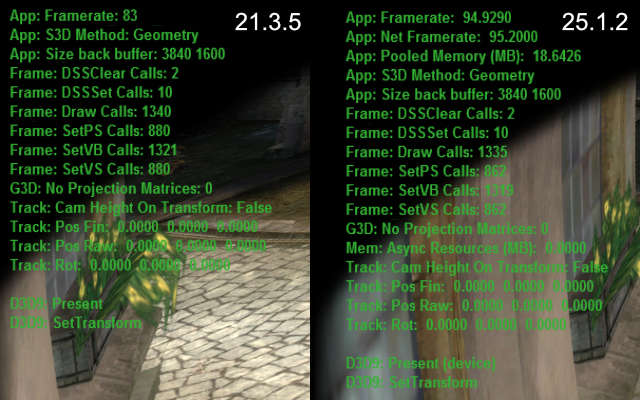
Witcher 1: 25.1.2 is actually ~15% faster at (almost) identical draw counts in this game.
For your convenience the original reply again:
Definitely not a general issue. Please try a factory reset in the config app.
Also make sure that everything is set like before: game resolution, antialising settings etc. Start with setting your GPU drier and game settings to default and go from there.
Last but not least, try different sync modes in the vorpX menu. Earlier versions had a bug where a different sync mode was actually used than shown in the menu. Quite unlikely, but not entirely impossible that without you changing anything the sync mode is now a slower one than before.
If none of that helps, please create a trouble shoot archive in the config app and send it to support at vorpx com.
Dec 4, 2025 at 7:34pm #222490AnatolijParticipantWhat program did you use to take these pictures (so that the program version would be officially visible) ? I can take the same ones, but with a completely opposite result. And why is there nothing visible in your picture at all, no open city, no crowds of people ? You’ve made some kind of clever snippet where there’s nothing at all, naturally, no performance requirement there. And how do you explain that version 25.1.2 runs slightly faster than 21.3.5 on your system? Why then is it the other way around on my system (described above), with version 21.3.5 performance not 15% higher, but at least 50% higher ? Understand, there’s no point in me making this up and wasting my time here trying to unsuccessfully prove it to you. My system and components are 200% fine, as I’ve been building PCs and installing software for 20 years, and I’ve played dozens of games on this system with maximum performance. The same The Witcher 1.2 in 2D mode deliver over 200 (1 Witcher) and 230 (2 Witcher) FPS. And this problem (with very low performance on the new version) so far only affects two games that I decided to test, The Witcher 1.2. What might happen if I dig deeper… and test 20 games with DX9? And all your advice (constantly quoted) is completely useless, since I tried them yesterday, even before I wrote the first post here.
Dec 4, 2025 at 8:52pm #222491RalfKeymasterThat’s a debug overlay.
I didn’t deny that you have a problem. I said that there is no general issue with the latest vorpX version, so you have to look for something specific to your configuration. Everything that comes to mind without more palpable information is in my original reply.
No matter how often you post the same thing here, looking at your system info and log files, which you did not send yet, is (while no guarantee, of course) all the support that I can offer you. And lot more than larger companies would actually do BTW.
Dec 7, 2025 at 9:34am #222502AnatolijParticipantThank you very much Ralf, for your reply and support. Please don’t think I don’t appreciate your efforts and the fact that you constantly update the program. However, I personally have had very bad luck with these updates, and this isn’t the first time the updated VorpX has performed worse than previous versions. The problem is truly strange. Games like The Witcher 1.2 have worse performance than, say, Lust From Beyond (I recently played it), which is also rendered in G3D. In this game, with its very capricious and unoptimized engine (Unity 5), Lust From Beyond runs at a stable 80-90 frames per second almost all the time. But when I decided to try Lust From Beyond on the previous versions 21.3.5 and 24.1.0, the performance also surprised me. The FPS barely dropped, remaining at a stable 90 frames per second almost all the time, even at maximum graphics settings and a resolution of 2880×2160.
Could you be more specific about where I can get these log files (system information) ? I’m just not sure what data you need. A screenshot, if possible. I’ll try to send them to you; maybe it will help solve my problem.
Dec 7, 2025 at 9:54am #222503RalfKeymasterFor your convenience a third time, now with added highlighting:
If none of that helps, please create a trouble shoot archive in the config app and send it to support at vorpx com
Dec 7, 2025 at 11:33am #222504AnatolijParticipantI’ve created and sent reports for versions 24.1.0 and 25.1.2. I hope these reports are helpful. I’ll be waiting for your response and a possible solution to this low performance issue on DX9 in the new version. Thanks in advance.
Dec 7, 2025 at 11:42am #222505RalfKeymasterThanks. I’ll get back to you if I can spot anything unusual regarding your config.
If not, rest assured that all trouble shoot data gets investigated and factored into development.
Dec 16, 2025 at 9:20pm #222537RalfKeymaster25/12/16 | vorpX 25.1.3 has been released
Another maintenance update, mainly addressing various issues and annoyances that came up since 25.1.2. Aside from the fixes there is a subtle improvement in regard to how the game/desktop images are sampled before sending them to the headset. Power users can also configure the sampling method now with expert settings enabled.
Click here for a list of noteworthy changes
- vorpX: Battlefield 2 could crash on map load.
- vorpX: some games could crash on CPUs with more than 12 cores.
- vorpX: different image sampling methods for screen/FullVR modes.
- vorpX: image sampling method user selectable (expert setting).
- vorpX: option to improve FPS in games that limit core count (e.g. Witcher 1 GOG).
- vorpX: back to OpenXR 1.0 due to outdated runtimes (eg. Valve, Virtual Desktop).
- vorpX: relaunching games with another graphics API could fail.
- vorpX: DX9: (rare) 64-bit DX9 games ran at roughly half the supposed FPS on Win11.
- vorpX: DX9: some FPS lost since quite a while have been reclaimed (eg. Skyrim).
- vorpX: DX11: Z3D did not work anymore in several games (e.g. COD Black Ops III).
- vorpX: DX12: fixed an (currently unused) Z3D method that didn’t work at all.
- vorpControl: hook helper install auto API detection didn’t work anymore.
- vorpControl: creating desktop shortcuts did not always work anymore.
- vorpService: fallback for virtual display/desktop viewer not working on some PCs.
- vorpService: The virtual display didn’t always get disabled on standby as intended.
- vorpService: Quest Link detection not working anymore after a recent Link update.
- Just Cause 3: depth buffer detection could fail occasionally.
- The Witcher 3: DirectVR: camera position was broken, second position added.
- The Witcher 3: DirectVR: auto EdgePeek for menus, cutscenes etc. didn’t work.
- Elder Scrolls Online: shader parser to detect future UI changes automatically.
- F1 2019: restarting with DX11 didn’t work anymore.
- F1 2020: restarting with DX11 didn’t work anymore.
Dec 20, 2025 at 4:25pm #222563sylvanParticipantHELLO, is this a coincidence: but since the new update, Jedi Survivor and Dead Rising 2 no longer support VorpX?
-
AuthorPosts
- You must be logged in to reply to this topic.