
Archives

Homepage Forums Search Search Results for 'Fe'

Viewing 15 results - 106 through 120 (of 13,964 total)
  • Author
    Search Results
  • #222494
    Boblekobold
    Participant

    There is an Unreal Engine 5 profile. Just create a new one based on it, and add the .exe file (or the process if you can’t access it, and it will add the executable permanently anyway).

    I used this method on Nightingale and it worked well :
    https://www.vorpx.com/forums/topic/nightingale-2/

    Adjust the resolution (game), FOV (game), zoom (VorpX) and headtracking speed (in this order) until it’s perfect.

    antoineplu
    Participant

    I have the following hardware: RTX 3080, Windows 11, Meta Quest 3, and a 5 GHz router, but I’m not sure it supports Wi-Fi 6.

    I’m connected to three monitors; that might be a lot, but even when I disable them, I don’t really notice any change.

    I can connect Meta’s Air Link without much trouble, though I sometimes get an error because the 2.4 GHz band seems to be missing — yet the connection still works.

    I try to launch Kingdom Come Deliverance 2, but I get lost in the settings. I can start the game on the PC, but it never launches the display in the VR headset.

    I’ve tried many things, and it’s quite confusing for me to sum up all the (likely) wrong manipulations causing bugs. The whole setup feels rather erratic. I even noticed that the game’s settings (in 4/5 resolution) would reset when I launched it.

    I tested with Fallout 3 to see if I could at least make another game run through VorpX, and that worked quite well.

    Could you share any feedback, general advice, or essential steps to make this game work properly?

    —————– (version original de mon post en français)—————-

    Je possède le hardware suivant : rtx3080 Windows 11 Meta Quest 3 Un routeur en 5 GHz, mais je ne suis pas convaincu qu’il est Wi-Fi 6
    Je suis connecté à 3 écrans, c’est peut-être beaucoup, mais même quand je les désactive, je n’ai pas vraiment l’impression d’un changement.
    Je parviens sans trop de problème à connecter Air Link de Meta, j’ai parfois une erreur car la bande 2.4 GHz semble être absente, mais la connexion se fait.
    Je tente de lancer Kingdom Come Deliverance 2, mais je m’y perds dans les réglages. Je parviens à lancer le jeu sur le PC, mais jamais à lancer l’affichage dans le casque VR.
    J’ai essayé beaucoup de choses et c’est assez confus pour moi de récapituler toutes les (probables) mauvaises manipulations sources de bugs. L’ensemble me paraît assez erratique. J’ai même constaté que le paramétrage du jeu (en résolution 4/5) sautait quand je le lançais.
    J’ai testé avec Fallout 3 pour voir si j’arrivais quand même à faire tourner un autre jeu avec VorpX, et cela a été un succès sans trop de problème.
    Pourriez-vous me donner des retours d’expériences ou des conseils généraux, ou des impératifs absolus pour réussir à utiliser ce jeu ?

    #222491
    Ralf
    Keymaster

    That’s a debug overlay.

    I didn’t deny that you have a problem. I said that there is no general issue with the latest vorpX version, so you have to look for something specific to your configuration. Everything that comes to mind without more palpable information is in my original reply.

    No matter how often you post the same thing here, looking at your system info and log files, which you did not send yet, is (while no guarantee, of course) all the support that I can offer you. And lot more than larger companies would actually do BTW.

    #222490
    Anatolij
    Participant

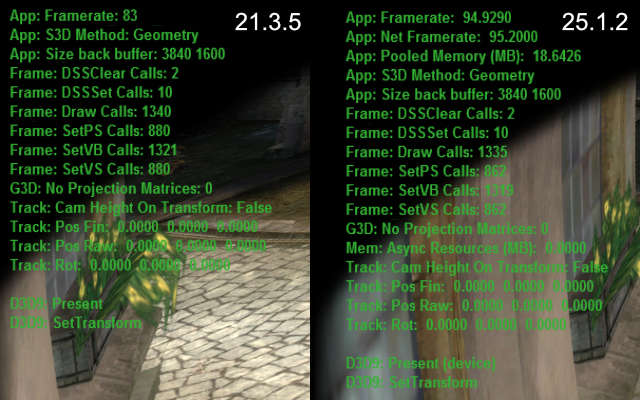
    What program did you use to take these pictures (so that the program version would be officially visible) ? I can take the same ones, but with a completely opposite result. And why is there nothing visible in your picture at all, no open city, no crowds of people ? You’ve made some kind of clever snippet where there’s nothing at all, naturally, no performance requirement there. And how do you explain that version 25.1.2 runs slightly faster than 21.3.5 on your system? Why then is it the other way around on my system (described above), with version 21.3.5 performance not 15% higher, but at least 50% higher ? Understand, there’s no point in me making this up and wasting my time here trying to unsuccessfully prove it to you. My system and components are 200% fine, as I’ve been building PCs and installing software for 20 years, and I’ve played dozens of games on this system with maximum performance. The same The Witcher 1.2 in 2D mode deliver over 200 (1 Witcher) and 230 (2 Witcher) FPS. And this problem (with very low performance on the new version) so far only affects two games that I decided to test, The Witcher 1.2. What might happen if I dig deeper… and test 20 games with DX9? And all your advice (constantly quoted) is completely useless, since I tried them yesterday, even before I wrote the first post here.

    #222486
    Ralf
    Keymaster

    Witcher 1: 25.1.2 is actually ~15% faster at (almost) identical draw counts in this game.

    For your convenience the original reply again:

    Definitely not a general issue. Please try a factory reset in the config app.

    Also make sure that everything is set like before: game resolution, antialising settings etc. Start with setting your GPU drier and game settings to default and go from there.

    Last but not least, try different sync modes in the vorpX menu. Earlier versions had a bug where a different sync mode was actually used than shown in the menu. Quite unlikely, but not entirely impossible that without you changing anything the sync mode is now a slower one than before.

    If none of that helps, please create a trouble shoot archive in the config app and send it to support at vorpx com.

    #222484
    Ralf
    Keymaster

    Before writing my original reply I checked the performance for you – in the games you mentioned. No issue at all.

    Also even if the new features and gazillion of other inprovements in the free 25.1 update don’t interest you: you don’t want to use 21.3 anymore for two simple reasons alone: 1. DX12 games only show a black screen on newer nVidia drivers, 2. 64bit DX9 games actually do run at half the FPS in 21.3 on Windows 11 because a Windows 11 update last year broke vorpX’s fast DX9 capture for 64bit Dx9.

    BTW: safe to say that 25.1.2 is the most stable vorpX ever. Literally months of work were spent on fixing low level stuff that had been on the backburner for ages alone, as well as on hardening against quite arcane potential issues.

    #222482
    Anatolij
    Participant

    This is definitely a problem with the new version, since I ran all my tests exclusively with identical settings, resolution, etc., and I did this not a year ago, but yesterday, with 30-minute intervals (for each version), and I also reset the VorpX settings (both versions) to default. The fact that no one has reported this issue yet only suggests that others are either too lazy to report the problem, or it’s a bad design. Performance on certain video cards and specifically on The Witcher 1. I also tested with different synchronization modes in the new version (I didn’t change anything in version 21.3.5, as performance there was fine), and the poor performance issue remained. Version 21.3.5 is more stable and performant than version 25.1.2.
    Do you even test VorpX performance on AMD 6000-9000 series video cards ?

    And today I tested with version 24.1.0, and with it, The Witcher 1 runs at a stable 90 FPS. Draw your own conclusion… something is wrong with the new version 25.1.2, and certainly not on my system. I’ve already played at least 10 games on version 24.1.0, and there were no performance issues. You can check this yourself by running The Witcher 1 on version 21.3.5 or earlier, and then running it on version 25.1.2, you may also have problems with low FPS with version 25.1.2. And if it matters, I’m using a Meta Quest 3 headset via a cable link.

    #222481
    Ralf
    Keymaster

    Definitely not a general issue. Please try a factory reset in the config app.

    Also make sure that everything is set like before: game resolution, antialising settings etc. Start with setting your GPU drier and game settings to default and go from there.

    Last but not least, try different sync modes in the vorpX menu. Earlier versions had a bug where a different sync mode was actually used than shown in the menu. Quite unlikely, but not entirely impossible that without you changing anything the sync mode is now a slower one than before.

    If none of that helps, please create a trouble shoot archive in the config app and send it to support at vorpx com.

    #222464
    Boblekobold
    Participant

    I played Deathloop and Redfall with a free gamepass offer a few years ago. I regret concerning Deathloop because it have been offered on Epic, I don’t wan’t to pay the gamepass, and I can’t transfer my save ;)

    I guess most games work. It was hard to use G-Hub with the gamepass (I had to use a profile directly in my mouse), but it was possible to use VorpX. If I remember correctly, I had to add the process instead of the file in order to link with unsupported games. If you don’t create your own profile, you shouldn’t need to.

    #222452
    dimensionaldude
    Participant

    I can try a 100% vanilla OS setup on it later to see if it works, I would be baffled if it does. Do you think there’s any chance something from the Pimax software interferes with it on the Crystal Super?

    #222441
    Ralf
    Keymaster

    There will be a workaround in the next maintenance release that requests manual elevation if auto elevatng from the service fails. Probably won’t help with the virtual display though, but maybe you are lucky.

    To get rid of the actual issue, you will have to get rid of the root cause. This is a restriction imposed by your OS config or maybe some interfering security software. Nothing vorpX can do about that obviously. A normal (current!) Windows 10/11, freshly installed, under normal circumstances should work fine.

    Either way all core vorpX functionality works perfectly well, even if you can’t figure out what in your configuration causes these restrictions.

    austint
    Participant

    Hello,

    I am a Pimax Crystal Super user and I am also having this issue to the tea. It’s obvious that Vorpx isn’t rendering at the actual resolution of the headset. The “screen” texture does have the correct screen resolution.

    While running in Vorpx I looked at my SteamVR resolution and it’s at 7640×7688 (crazy high resolution lol). So, SteamVR should be reporting the correct resolution to Vorpx.

    Instead, it feels like it’s still using the resolution of my old Valve Index.

    #222416
    Ralf
    Keymaster

    Unsupported games, so I can’t really say anything useful. Sounds like an invalid depth buffer, but that’s just a guess from your issue description.

    If you have downloaded a user profile from the cloud for these games, check whether maybe the profile author added specific instructions in the profile description.

    #222411
    mirrorsedgefan42
    Participant

    i am running VorpX on a 7700xt
    game launches normally without interference
    i launch VorpX to hook
    this error is consistent:
    Failed to create DXT Texture. This game requires DXT support. If you have manually disabled it, please re-enable it and try again.
    Game launches fine when running in DX10, I have set that setting in the config.ini.
    Hook Helper does not help at all. Despite setting it to manually be used DX10. My headset is recognized fine. Mirror’s edge will not open
    i have installed physx, done whatever I could.
    i cannot seem to find where to actually *edit* the profile to directly use dx10..? I do not know what to do. this game is the main reason i own VorpX to begin with, and consistently having problems in multiple facets of getting even basic functionality.

    #222398

    In reply to: VR struggle

    IroquoisPliskin
    Participant

    Just wanted to chime in and piggyback off the OP, Ralf Ihave been thinking lately that i appreciate all your work and I remember you saying that the updates cost you time and you were thinking of monetizing updates. Nothing in life is free and I believe this software is worth paying fees for in future if need be, just hope it doesn’t become the deterrent.

    Best wishes

Viewing 15 results - 106 through 120 (of 13,964 total)

Spread the word. Share this post!