
-
AuthorSearch Results
-
Dec 4, 2025 at 7:34pm #222490
In reply to: vorpX 25.1.5 Available Now
 AnatolijParticipant
What program did you use to take these pictures (so that the program version would be officially visible) ? I can take the same ones, but with a completely opposite result. And why is there nothing visible in your picture at all, no open city, no crowds of people ? You’ve made some kind of clever snippet where there’s nothing at all, naturally, no performance requirement there. And how do you explain that version 25.1.2 runs slightly faster than 21.3.5 on your system? Why then is it the other way around on my system (described above), with version 21.3.5 performance not 15% higher, but at least 50% higher ? Understand, there’s no point in me making this up and wasting my time here trying to unsuccessfully prove it to you. My system and components are 200% fine, as I’ve been building PCs and installing software for 20 years, and I’ve played dozens of games on this system with maximum performance. The same The Witcher 1.2 in 2D mode deliver over 200 (1 Witcher) and 230 (2 Witcher) FPS. And this problem (with very low performance on the new version) so far only affects two games that I decided to test, The Witcher 1.2. What might happen if I dig deeper… and test 20 games with DX9? And all your advice (constantly quoted) is completely useless, since I tried them yesterday, even before I wrote the first post here.
Dec 4, 2025 at 10:33am #222486In reply to: vorpX 25.1.5 Available Now
RalfKeymaster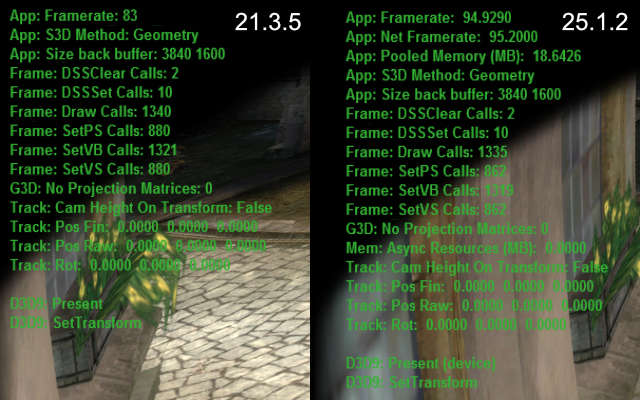
Witcher 1: 25.1.2 is actually ~15% faster at (almost) identical draw counts in this game.
For your convenience the original reply again:
Definitely not a general issue. Please try a factory reset in the config app.
Also make sure that everything is set like before: game resolution, antialising settings etc. Start with setting your GPU drier and game settings to default and go from there.
Last but not least, try different sync modes in the vorpX menu. Earlier versions had a bug where a different sync mode was actually used than shown in the menu. Quite unlikely, but not entirely impossible that without you changing anything the sync mode is now a slower one than before.
If none of that helps, please create a trouble shoot archive in the config app and send it to support at vorpx com.
Dec 4, 2025 at 7:32am #222483In reply to: vorpX 25.1.5 Available Now
AnatolijParticipantAnd another important note: people aren’t reporting poor performance in the new version for a simple reason: they simply have nothing to compare it to, since most people don’t back up previous versions like I do. So I have something to compare it to and the option to roll back to an earlier version. The only thing that really irritates me is that this blatant automatic update can’t be disabled. Is it really that hard to disable the automatic update option ?
Dec 4, 2025 at 7:14am #222482In reply to: vorpX 25.1.5 Available Now
AnatolijParticipantThis is definitely a problem with the new version, since I ran all my tests exclusively with identical settings, resolution, etc., and I did this not a year ago, but yesterday, with 30-minute intervals (for each version), and I also reset the VorpX settings (both versions) to default. The fact that no one has reported this issue yet only suggests that others are either too lazy to report the problem, or it’s a bad design. Performance on certain video cards and specifically on The Witcher 1. I also tested with different synchronization modes in the new version (I didn’t change anything in version 21.3.5, as performance there was fine), and the poor performance issue remained. Version 21.3.5 is more stable and performant than version 25.1.2.
Do you even test VorpX performance on AMD 6000-9000 series video cards ?And today I tested with version 24.1.0, and with it, The Witcher 1 runs at a stable 90 FPS. Draw your own conclusion… something is wrong with the new version 25.1.2, and certainly not on my system. I’ve already played at least 10 games on version 24.1.0, and there were no performance issues. You can check this yourself by running The Witcher 1 on version 21.3.5 or earlier, and then running it on version 25.1.2, you may also have problems with low FPS with version 25.1.2. And if it matters, I’m using a Meta Quest 3 headset via a cable link.
Dec 3, 2025 at 4:57pm #222481In reply to: vorpX 25.1.5 Available Now
RalfKeymasterDefinitely not a general issue. Please try a factory reset in the config app.
Also make sure that everything is set like before: game resolution, antialising settings etc. Start with setting your GPU drier and game settings to default and go from there.
Last but not least, try different sync modes in the vorpX menu. Earlier versions had a bug where a different sync mode was actually used than shown in the menu. Quite unlikely, but not entirely impossible that without you changing anything the sync mode is now a slower one than before.
If none of that helps, please create a trouble shoot archive in the config app and send it to support at vorpx com.
Dec 2, 2025 at 11:30pm #222480In reply to: vorpX 25.1.5 Available Now
AnatolijParticipantGreetings Ralf. I just encountered a serious performance issue with the latest version of VorpX. Specifically, with DX9 and even DX11. Example: In The Witcher and The Witcher 2, with the latest version, I get 30-60FPS out of 90. But with version 21.3.5, The Witcher 1 runs at a stable 90FPS, while in Witcher 2 70-90FPS. The same with The Darkness II. With the latest version, I get 30-70FPS out of 90, but with version 21.3.5, I get a stable 90FPS. How can this be? Why does the new version have such serious performance issues, especially on a pre-high-end PC? And how can I disable this blatant automatic update that only ruins everything? I want to enjoy the game at a stable 90-120FPS with version 21.3.5, instead of constant lag and low FPS with the latest version.
My system: Windows 11 Home, 25H2 26200.7309
M.B.: ASRock X870 Steel Legend WiFi / CPU: AMD Ryzen 7 9800X3D / RAM: Kingston 2x16GB DDR5-6000MHz / GPU: PowerColor 7900XTX Hellhound White 2800 MHz UV 1.12V/SSD: Kingston 2TB NVMeNov 23, 2025 at 7:28pm #222452In reply to: Problems with virtual monitor (>60fps not working)
dimensionaldudeParticipantI can try a 100% vanilla OS setup on it later to see if it works, I would be baffled if it does. Do you think there’s any chance something from the Pimax software interferes with it on the Crystal Super?
Nov 22, 2025 at 9:15am #222441In reply to: Problems with virtual monitor (>60fps not working)
RalfKeymasterThere will be a workaround in the next maintenance release that requests manual elevation if auto elevatng from the service fails. Probably won’t help with the virtual display though, but maybe you are lucky.
To get rid of the actual issue, you will have to get rid of the root cause. This is a restriction imposed by your OS config or maybe some interfering security software. Nothing vorpX can do about that obviously. A normal (current!) Windows 10/11, freshly installed, under normal circumstances should work fine.
Either way all core vorpX functionality works perfectly well, even if you can’t figure out what in your configuration causes these restrictions.
Nov 22, 2025 at 9:14am #222439In reply to: Unable to launch Mirrors Edge
RalfKeymasterCan’t replicate that, neither with the Steam version nor with the EA version. Never actually heard anything like that in over a decade since the profile has been created as far as I recall.
In case you haven’t done that already, please first check whether the game works without vorpX on your PC. Judging from a thread on the Steam forum where someone had this issue, it might be related to running the game on a newer Intel GPU, which IIRC don’t natively support DX9 anymore and instead use a software wrapper.
BTW: There is no point in running the game with DX10, the profile is made for the default DX9 mode.
Nov 22, 2025 at 9:05am #222437RalfKeymaster- You have to run games at the resolution you want them to run, i.e. change the resolution in the game options accordingly. vorpX does not automatically render games at the resolution you set in SteamVR, The resolution set in the game options is the only thing you have to care about.
- If after setting the game resolution high enough you still get a pixelated image, the issue is caused by the Pimax software after vorpX hands the image over to SteamVR. This is not an issue on vorpX’s end. There is no, and never has been a ‘low resolution bug’. What I’m getting from this thread here is that the issue might be related to Pimax’s fixed foveated rendering, which should be turned off.
- If that still doesn’t help, ask Pimax what the heck they are doing.
Nov 21, 2025 at 9:20pm #222421In reply to: Horizontal colored lines in multiple games
subroutineParticipantI get exactly the same issue with FS25 using a copy of the FS22 profile but only if I remove my headset while the game is running. Once the bug is triggered, a game restart is required. Everything runs fine other than that. 9800x3d, 5900 and Quest3.
Nov 21, 2025 at 1:45pm #222419In reply to: Problems with virtual monitor (>60fps not working)
dimensionaldudeParticipantJust an update: I completely reinstalled my OS and this is still happening. Following the troubleshooting advice, in the vorpService.log it says the following over and over when trying to launch the desktop viewer:
ERR: createProcessAsUserWithAdminRights: retrieving the excution token failed: -3
It seems like something on my system is preventing it from launching. Again, I should have full admin rights to launching everything. Is there some Windows service the virtual monitor depends on to launch or something? I’m low on ideas of what to do here.
Nov 21, 2025 at 12:10pm #222416In reply to: Horizontal colored lines in multiple games
RalfKeymasterUnsupported games, so I can’t really say anything useful. Sounds like an invalid depth buffer, but that’s just a guess from your issue description.
If you have downloaded a user profile from the cloud for these games, check whether maybe the profile author added specific instructions in the profile description.
Nov 18, 2025 at 7:14pm #222404Topic: The new Desktop Viewer is great
in forum General vorpX DiscussionMarcDwonnParticipantI upgraded yesterday to the latest version (from v21.xx), and i’m loving the new Desktop Viewer’s performance and syncing. Great work, Ralf! With the impending Steam Frame, i can see myself spending much time again with this software, that’s been my “main driver” for so many years in the past.
Could use a bit of help though: I’m trying to get “The Last Of Us Part 2” running with VorpX, but can’t find a profile, so i followed your advice to make a copy of the generic SBS profile and run the game with that.
I’m using a tool that translates the game into a stereo3D SBS stream which i’m trying to play with VorpX, but VorpX tries to hook into the game and finds the extra DLL of this tool, and nothing works.
Workaround was to *exclude* the game EXE from VorpX watcher. Start VorpX Desktop, then from there start the game. VorpX is still giving me warning messages about a foreign DLL found, but at least it’s working, and the performance is good.
What’s the best way to approach this and minimize the friction and potential errors? It’s very umständlich atm. :)
Nov 16, 2025 at 5:18am #222398In reply to: VR struggle
IroquoisPliskinParticipantJust wanted to chime in and piggyback off the OP, Ralf Ihave been thinking lately that i appreciate all your work and I remember you saying that the updates cost you time and you were thinking of monetizing updates. Nothing in life is free and I believe this software is worth paying fees for in future if need be, just hope it doesn’t become the deterrent.
Best wishes
-
AuthorSearch Results
-
Search Results
-
I upgraded yesterday to the latest version (from v21.xx), and i’m loving the new Desktop Viewer’s performance and syncing. Great work, Ralf! With the impending Steam Frame, i can see myself spending much time again with this software, that’s been my “main driver” for so many years in the past.
Could use a bit of help though: I’m trying to get “The Last Of Us Part 2” running with VorpX, but can’t find a profile, so i followed your advice to make a copy of the generic SBS profile and run the game with that.
I’m using a tool that translates the game into a stereo3D SBS stream which i’m trying to play with VorpX, but VorpX tries to hook into the game and finds the extra DLL of this tool, and nothing works.
Workaround was to *exclude* the game EXE from VorpX watcher. Start VorpX Desktop, then from there start the game. VorpX is still giving me warning messages about a foreign DLL found, but at least it’s working, and the performance is good.
What’s the best way to approach this and minimize the friction and potential errors? It’s very umständlich atm. :)