I wonder if there´s a way to play The Witcher 3 old gen in newer Vorpx version, to have benefit of more flawless of newer versions and gesture controls. Since 24.0, vorpx it´s locked for new gen version, which in my opinion is much worse. The old gen profile is better, with a good (but not perfect) G3D, if some reflections and shadows isssues, but in general the sense of presence in scene is very good. Anyone discovered a workaround to avoid 25.1.5 or other newer versions to bypass new gen detection? I just renamed the main The Witcher 3 dx11 .exe and connected with a custom profile based on cloud profiles of the old gen versions and it worked, but since I use mods (First person mod), they don´t work in this way.
Here a video of me playing recently with Vorpx and some mods to make more VR friendly:
Whenever I start Witcher 3 Classic 1.32 with Vorpx it says newer vorpx versions only support next-gen. Is there a way to get it hook it to classic 1.32 for better performance? I just want the normal G3D not the alternate eye rendering stuff (there are too many graphical artifacts?) and better performance ofcourse.
I’d rather crank up the resolution to max and add texture mods to 1.32 than play the crippled next-gen version.
I read that vorpX v21.3.5 has support for it. How do I download that? And why there’s no seperate profile for the older, classic version anymore?
Since everyone recommends playing old dx9 versions of Bioshocks, Mass Effects and Batmans. Why not Witcher too?
The gamepad override is necessary if you want mouse based head tracking in many games since many games can’t handle simultaneous mouse/gamepad input. Hence vorpX can override gamepads and map your gamepad to mouse/keyboard. The alternative to that would be no gamepad at all in affected games. So that#s a feature, not a bug. ;)
If you don’t want/need mouse emulation head tracking, you can safely turn the override off. Make sure to set the head tracking sensitivity to 0.0 in that case, otherwise you will create input conflicts in games that can’t handle mouse and gamepad input at the same time.
3D works in both DX11 and DX12, provided you:
Use the latest vorpX
Use the latest Witcher 3
If you have a camera mod installed, try without, will likely interfere.
Use the profile’s default settings (i.e. 3D set to ‘DirectVR’)
Do not disable automatic settings, they are often vital.
I’m using the GOG version through Steam with Steam Input. I can’t seem to get the controller to work properly, it always shows the PC UI.
Can I turn the full VorpX gamepad emulation off?
I just want it to render a virtual monitor and run in 3D.
Also, it would be great if it could work in DirectX 12, 3D depth doesn’t work.
40€ is not a small sum of money for me, so I’m really hoping I can get this thing to work with a normal gamepad.
Quest 3, vorpx 25.1.5, RTX 5090, Driver 595.79, using virtual monitor
I’ve been tinkering a lot to make Witcher 3 look great and results would be amazing. 5090 handles ~Ultra settings at 3648×3840@120Hz (Virtual Desktop Godlike res + H264+ ~400Mbps for the best image).
Two outstanding issues:
* The image suddenly corrupts after ~1-10minutes as in the screenshot at these non standard resolutions tested – repros at 2736×2880 too. Not sure if it’s because the res are high or that they are “unmanaged”. Usually the whole frame corrupts, and often with red and blue “fractal” regions.
This repros through Oculus too, not just OpenXR/VD.
I’ve not reproed this with vorpx managed resolutions (Ultra).
I’ve not reproed this without vorpx at 6832×4840 in 25 mins (though might be just chance).
I don’t have similar problems elsewhere, and haven’t reproed hardware problems with OCCT VRAM test + concurrent FurMark to drive temp up.
Interestingly, the corruption persists after resolution change, and even Exit To Main Menu -> Load Game.
* OpenXR/VD
I understand it’s not recommended but have no perf issues with this setup, but a control issue – when putting the headset down, seems that some movement is captured when the headset “disconnects” (during movement of putting the camera down) and gets continuously reapplied making the mouse/camera move all over the place – persists after reconnecting, haven’t figured out a way to reset it.
Hey, I’m running Witcher 3 using the VorpX profile. All working fairly well but for some reason I don’t have DLSS or Ray Tracing as available options on the in game menu. Is this by choice? Anyway I can enable them? Thanks for any help.
Game plays well in G3D but once in a while I have a few drops, I want to play in Z3D but it is only visible when re-centering the headset. Once the message disappear the 3D effect disappears. Again only for Z3D. Anyone know how to make it work?
Thanks for the VorpX update, Ralf! I’m currently trying to play The Witcher 3 Next-Gen with the Gervant First Person mod.
I’ve noticed that whenever I switch to first-person view, I lose the 3D effect. The 3D only returns when I switch back to third-person. Is there a way to make the 3D work correctly in first-person?
Also, would you consider adding a native first-person camera to VorpX? That might help avoid conflicts with external mods.
Hi, i was hoping to try out witcher 3 in vr during the holidays but it can’t get vorpx running, i changed PC and the new installation never finalized…. i have vorpx v25.1.4.0.
Could you help.
Cordially.
Another maintenance update, mainly addressing various issues and annoyances that came up since 25.1.2. Aside from the fixes there is a subtle improvement in regard to how the game/desktop images are sampled before sending them to the headset. Power users can also configure the sampling method now with expert settings enabled.
Click here for a list of noteworthy changes
vorpX: Battlefield 2 could crash on map load.
vorpX: some games could crash on CPUs with more than 12 cores.
vorpX: different image sampling methods for screen/FullVR modes.
vorpX: image sampling method user selectable (expert setting).
vorpX: option to improve FPS in games that limit core count (e.g. Witcher 1 GOG).
vorpX: back to OpenXR 1.0 due to outdated runtimes (eg. Valve, Virtual Desktop).
vorpX: relaunching games with another graphics API could fail.
vorpX: DX9: (rare) 64-bit DX9 games ran at roughly half the supposed FPS on Win11.
vorpX: DX9: some FPS lost since quite a while have been reclaimed (eg. Skyrim).
vorpX: DX11: Z3D did not work anymore in several games (e.g. COD Black Ops III).
vorpX: DX12: fixed an (currently unused) Z3D method that didn’t work at all.
vorpControl: hook helper install auto API detection didn’t work anymore.
vorpControl: creating desktop shortcuts did not always work anymore.
vorpService: fallback for virtual display/desktop viewer not working on some PCs.
vorpService: The virtual display didn’t always get disabled on standby as intended.
vorpService: Quest Link detection not working anymore after a recent Link update.
Just Cause 3: depth buffer detection could fail occasionally.
The Witcher 3: DirectVR: camera position was broken, second position added.
The Witcher 3: DirectVR: auto EdgePeek for menus, cutscenes etc. didn’t work.
Thank you very much Ralf, for your reply and support. Please don’t think I don’t appreciate your efforts and the fact that you constantly update the program. However, I personally have had very bad luck with these updates, and this isn’t the first time the updated VorpX has performed worse than previous versions. The problem is truly strange. Games like The Witcher 1.2 have worse performance than, say, Lust From Beyond (I recently played it), which is also rendered in G3D. In this game, with its very capricious and unoptimized engine (Unity 5), Lust From Beyond runs at a stable 80-90 frames per second almost all the time. But when I decided to try Lust From Beyond on the previous versions 21.3.5 and 24.1.0, the performance also surprised me. The FPS barely dropped, remaining at a stable 90 frames per second almost all the time, even at maximum graphics settings and a resolution of 2880×2160.
Could you be more specific about where I can get these log files (system information) ? I’m just not sure what data you need. A screenshot, if possible. I’ll try to send them to you; maybe it will help solve my problem.
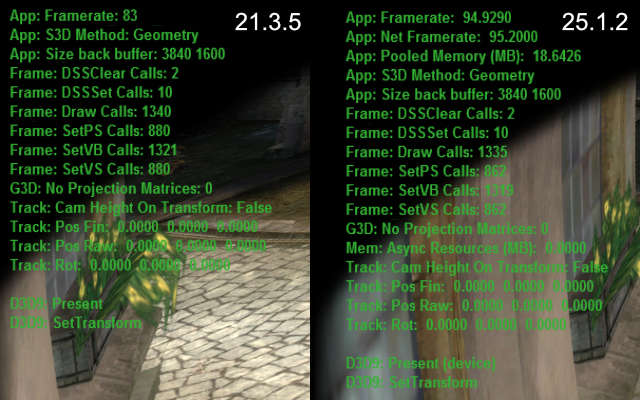
What program did you use to take these pictures (so that the program version would be officially visible) ? I can take the same ones, but with a completely opposite result. And why is there nothing visible in your picture at all, no open city, no crowds of people ? You’ve made some kind of clever snippet where there’s nothing at all, naturally, no performance requirement there. And how do you explain that version 25.1.2 runs slightly faster than 21.3.5 on your system? Why then is it the other way around on my system (described above), with version 21.3.5 performance not 15% higher, but at least 50% higher ? Understand, there’s no point in me making this up and wasting my time here trying to unsuccessfully prove it to you. My system and components are 200% fine, as I’ve been building PCs and installing software for 20 years, and I’ve played dozens of games on this system with maximum performance. The same The Witcher 1.2 in 2D mode deliver over 200 (1 Witcher) and 230 (2 Witcher) FPS. And this problem (with very low performance on the new version) so far only affects two games that I decided to test, The Witcher 1.2. What might happen if I dig deeper… and test 20 games with DX9? And all your advice (constantly quoted) is completely useless, since I tried them yesterday, even before I wrote the first post here.
Witcher 1: 25.1.2 is actually ~15% faster at (almost) identical draw counts in this game.
For your convenience the original reply again:
Definitely not a general issue. Please try a factory reset in the config app.
Also make sure that everything is set like before: game resolution, antialising settings etc. Start with setting your GPU drier and game settings to default and go from there.
Last but not least, try different sync modes in the vorpX menu. Earlier versions had a bug where a different sync mode was actually used than shown in the menu. Quite unlikely, but not entirely impossible that without you changing anything the sync mode is now a slower one than before.
If none of that helps, please create a trouble shoot archive in the config app and send it to support at vorpx com.
Then why do earlier versions run more stably and with higher FPS than the latest (on my PC) ? Do you think my system is to blame ? And have you definitely tested The Witcher 1’s performance on the latest version, and on your system (Windows 11) is it stable at 90-120 FPS at 2880×2160 ? Because The Witcher 1 has the worst performance: 30-60 FPS, while The Witcher 2 (which is strange, since the game requires more resources) has 50-90. And what resolution did you test at ? I hope at least 2K ? I play at 2880×2160 resolution, and it’s not worth playing at a lower resolution, since this is the minimum resolution for a high-quality game for the Quest 3, and my card can provide a stable 90 FPS on any modern game with Z3D and a stable 90 FPS on older games with G3D, and this has already been tested in practice with version 24.1.0.