Keyboard shortcut ALT + L will activate a DirectVR scan if one exists for the profile you are using. But it should be in the menu as has been said.
Other useful keyboard shortcuts are in the Vorpx config app under ‘In-Game Key Bindings’.
hello,
did you navigate through the vorpx ingame menu ? there are many pages, right now i dont remember if directVR is in the very first page or second or third…
There is no official RAGE profile. If there is a custom profile created by a user in the cloud, it’s probably 2D. vorpX cannot provide stereo 3D for newer, shader based OpenGL games like RAGE. I don’t know what Supermodel is, sorry.
For Quake 3 please make sure to run the DirectVR scan after entering a level like indicated when you start the game. After a successful DirectVR scan the game automatically has perfect 1:1 head tracking without you having to adjust it in the vorpX ingame menu.
vorpX 18.2.4 has been released. This is a maintenance release that addresses the issues below.
- Opening the vorpX ingame menu with a gamepad can no longer cause games to hang.
- Vive/Touch controller gamepad stick emulation no longer feels jumpy under some circumstances.
- Vive controller trackpad rotation sensitivity is not framerate dependent anymore.
- VR controllers cannot be considered in use anymore although they were never used.
- Deus Ex: Mankind Divided: fixed issue with occasionally losing depth when exiting menu screens.
- Left 4 Dead 2: DirectVR resolution and tweaks added.
Hi guys,
Vampire: The Masquerade – Bloodlines works quite awesomely with vorpx for the most part, I had a strange issue yesterday though. I was playing in Direct VR mode and as soon as I pitched my head to the side (to look around corners for example), head-tracking suddenly stopped working properly. After disabling DirectVR through the menu and enabling it again after some time, everything was fine again. Any ideas on what I could do to stop that from happening?
Best regards,
Polarius
@ matteo: Too many to list, but all minor tweaks. For the most part related to the changed gamepad functionality and a shader fix here and there.
@ RJK_ : This does the same as “Keep game specific options” did before, just allows to treat shader/DirectVR options separately now.
Important: keeping shader definitions does not make sense in 99% of cases if you make a copy of a profile for another game. They are almost always game specific. Make sure to read the tooltips for both options.
vorpX 18.2.3 has been released. This is a maintenance release that addresses the issues below.
- Better VR controller/gamepad interoperability
- Gamepad override didn’t work as intended with DirectVR head tracking. Among other things this enables use of a gamepad in Portal 2.
- Unwanted gamepad vibration should no longer occur while VR controllers are used
- Shader definitions and DirectVR scan settings can be kept/removed separately when copying a profile
- Some hotkey settings were only applied after a game restart
- Various profile fixes
Short update: the vorpX gamepad override will be available with DirectVR in the next vorpX version, which will fix this glitch. Was supposed to be case in Portal 2 already, but currently isn’t working due to a recently introduced bug.
That is pretty much unique to Portal 2 and a few other Source Engine 2 titles. Direct VR directly writes the camera rotation into the game’s memory which apparently causes a conflict with how the game handles the gamepad in these games. No promises, but I’ll look into it. So with a Go mouse and keyboard currently is the only viable option.
@ Slydog : with a Rift/Vive you can use the VR controllers instead if you don’t want to use mouse/keyboard. I’d highly recommended that anyway since the game even has basic roomscale support with DirectVR.
Hi, I just got into using VorpX seriously today, with my new Oculus Go and Riftcat. And it is all pretty cool, but I’m having a few problems. The only game I have tried so far is portal 2 so I don’t know if this issue is universal across all games or not. But I want to play the game with my controller, but after doing a DirectVR scan I am unable to look around using the right stick (everything else works fine), this makes the game essentially unplayable with a Gamepad, without constantly physically turning which is very nausea inducing. The Mouse still works fine for rotation, but I don’t really want to play with a Keyboard and Mouse. I tried mapping the right stick to the mouse using Xpadder but that didn’t work either. Turning Head tracking off allows the stick to work again, but then I can’t look around using my head. I ideally want to be able to turn only on the X-Axis with my Controller but still be able to physically look around on both axes. Does anyone know a workaround for this, and whether this is a problem across all games?
After a reset profil; same problem for geometry
and DirectVR auto scan (alt-L) always crash or fail
(Of course, i have the official Steam version)
As in game (COTW), with the new DirectVR mode I look to see if I really saw the 3D stereo reconstruction (geometry) to be active.
In the headset, it did not seem conclusive, but I was able to do a screenshoot to confirm the problem.
After launching SteamVR Mirror Mode, you can take Screenshots with the S key (if the window is in the foreground)
Here are the results, and we can see that there is in fact only the HUD interface of the game and Vorpx which is in 3D Stereo, for the rest of the game there is no perspective distortion due to paralaxe.
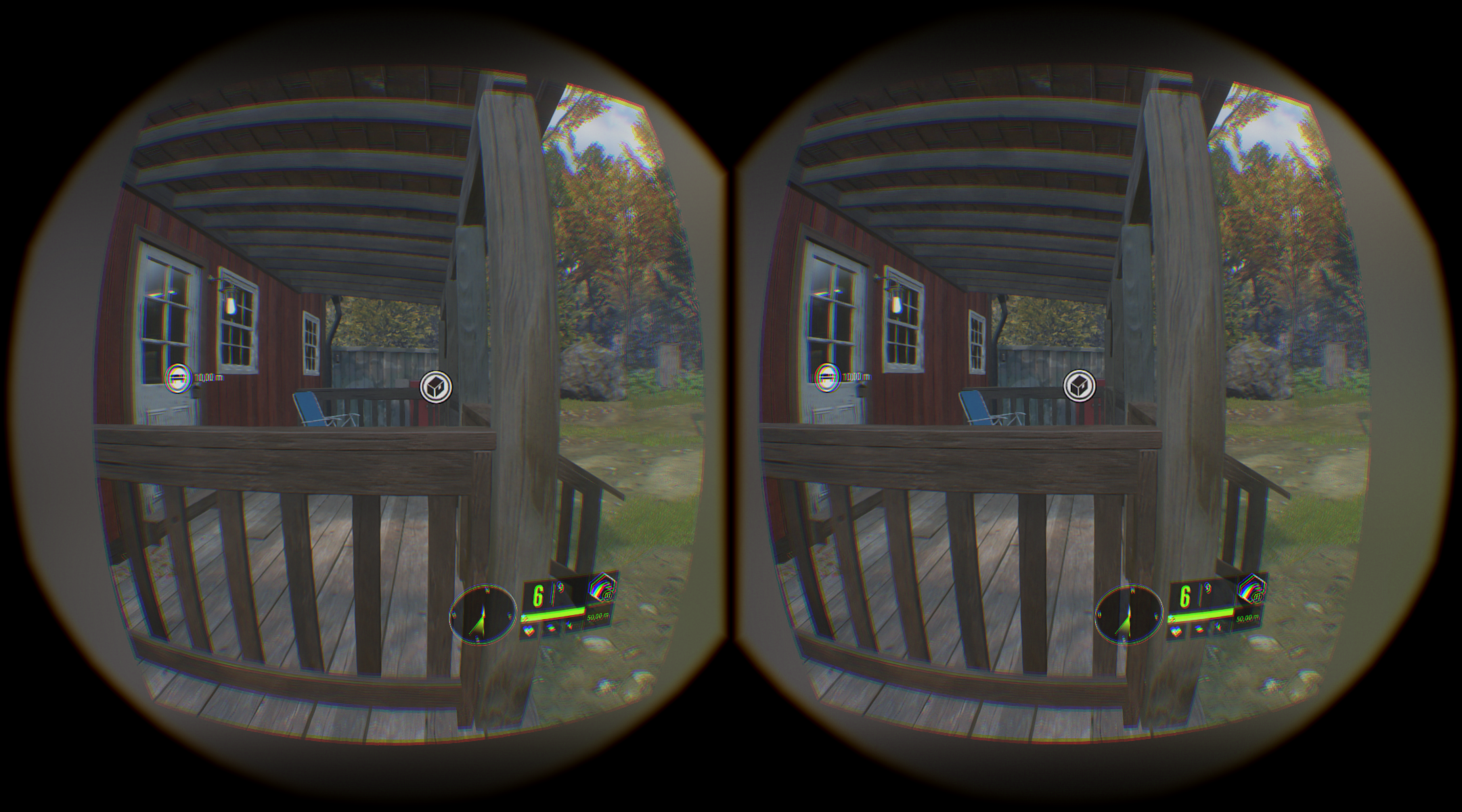
Is it a bug of a function not taken into account, or the impossibility of having real 3D geometry for this game?
(another screenshoot with HUD setting)

This should be addressed in the next vorpX version 18.2.0.
I’m not 100% certain since the issue was semi-random, but I was able to get past a notoriously crashy section in the game more than a dozen times now without a single crash, so it’s very likely fixed.
Feedback welcome after vorpX 18.2.0 is released (no date yet though).
Hi Ralf,
I’ve been keeping an eye on this thread because I too have found Bioshock 2 to be an issue, even though Bioshock 1 worked very well in DirectVR.
For me too, Bioshock 2 on Steam crashes frequently, even with 18.2.2 release 26th May 2018 in DirectVR mode. I can reach points on the first level when it will crash each time (when you first enter the sea), then during Ryan Amusements stepping off the train at the start on the 3rd level. I can play normally outside of VR in standard monitor mode to get past a crashing moment so I know it isn’t the game itself, but it happens so frequently and instantly it makes i impossible to continue in VR. It can also crash when trying to save progress, so it seems this Unreal Engine title is particularly unstable compared to Bioshock 1!
I’ve tried updating my nVidia 1080 to the latest drivers (they were only a couple of months out of date anyway), turned off all graphics options in the GUI, changed resolutions and have been through most relevant VorpX options in its GUI too, but no progress.
Are you able to try Bioshock yourself to see if it happens to you too- for me, it will crash from game start within 10 minutes of gameplay on that first level alone.
Aaaaand…
It’s Work !
DirectVR mode has been well recognized by Vorpx
And so we have a real stereoscopic 3D now (not Z3D)
Little bug of the game or vorpx (Dunno?)! the mask of the binoculars seems too short
My most embarrassing problem is always (has always been) the zoom whose maximum setting is too short at 90% (why not 100% or more?) Because I see the upper and lower edges with a Vive.
But that did not stop me from killing 4 bisons at .454 before I ran out of ammo
https://steamcommunity.com/sharedfiles/filedetails/?id=1394605156
anyone tried the hunter with new vorpx?
Whow !
New Game Profiles:
– The Hunter: Call of the Wild: G3D/Z3D, full VR, DirectVR: FOV, resolution, tracking, tweaks
You did well to ask the question;)
I will try this new version

