
Forum Replies Created
-
AuthorPosts
-
 RalfKeymaster
Super weird, provided things are actually off-center on your Q3, which is hard to tell from just photos. vorpX doesn’t do anything different on Q3 than it does on Q2, so if there is an actual problem, it almost certainly is something else.
RalfKeymasterThe game camera center has to be where the headset expects it to be in FullVR mode obviously. Otherwise you get image distortion in motion. vorpX just makes sure that both match, there is no margin for error (or adjustment) here.
Maybe something else is wrong, hard to tell. The way vorpX aligns the game camera to the headset frustum clearly isn’t. Considering that things work for you as you expect on Q2 but not on Q3 makes this even more weird. As you can probably imagine Q3 is the main dev headset here since quite a while and also commonly used by others.
Just in case you haven’t done that already try this:
- Switch to a different VR runtime in the vorpX config app, ideally use native Quest Link to minimize potential external factors.
- Recalibrate your play space.
- Recenter headtracking in vorpX (ALT+SPACE).
RalfKeymasterEverything in order. That’s how basically all VR headsets work, in native VR games too. Some more than others.
VR headsets use an asymmetric view frustum where more pixels are shown below the eye than above to have more precious pixels where it counts. A neat optimization that factors in human vision, which focuses more on things below your eyes than above in the sky.
RalfKeymasterThanks. I’ll get back to you if I can spot anything unusual regarding your config.
If not, rest assured that all trouble shoot data gets investigated and factored into development.
RalfKeymasterFor your convenience a third time, now with added highlighting:
If none of that helps, please create a trouble shoot archive in the config app and send it to support at vorpx com
RalfKeymasterThat’s a debug overlay.
I didn’t deny that you have a problem. I said that there is no general issue with the latest vorpX version, so you have to look for something specific to your configuration. Everything that comes to mind without more palpable information is in my original reply.
No matter how often you post the same thing here, looking at your system info and log files, which you did not send yet, is (while no guarantee, of course) all the support that I can offer you. And lot more than larger companies would actually do BTW.
RalfKeymaster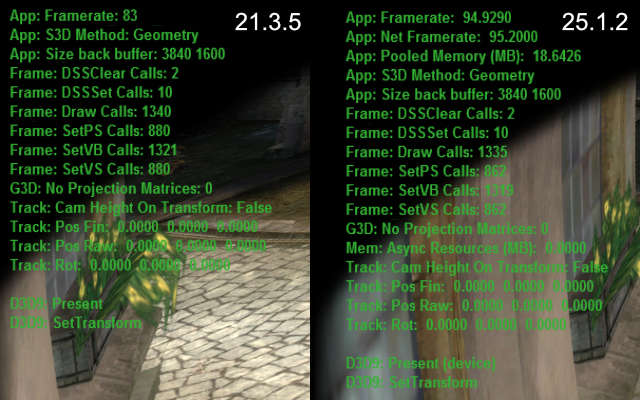
Witcher 1: 25.1.2 is actually ~15% faster at (almost) identical draw counts in this game.
For your convenience the original reply again:
Definitely not a general issue. Please try a factory reset in the config app.
Also make sure that everything is set like before: game resolution, antialising settings etc. Start with setting your GPU drier and game settings to default and go from there.
Last but not least, try different sync modes in the vorpX menu. Earlier versions had a bug where a different sync mode was actually used than shown in the menu. Quite unlikely, but not entirely impossible that without you changing anything the sync mode is now a slower one than before.
If none of that helps, please create a trouble shoot archive in the config app and send it to support at vorpx com.
RalfKeymasterBefore writing my original reply I checked the performance for you – in the games you mentioned. No issue at all.
Also even if the new features and gazillion of other inprovements in the free 25.1 update don’t interest you: you don’t want to use 21.3 anymore for two simple reasons alone: 1. DX12 games only show a black screen on newer nVidia drivers, 2. 64bit DX9 games actually do run at half the FPS in 21.3 on Windows 11 because a Windows 11 update last year broke vorpX’s fast DX9 capture for 64bit Dx9.
BTW: safe to say that 25.1.2 is the most stable vorpX ever. Literally months of work were spent on fixing low level stuff that had been on the backburner for ages alone, as well as on hardening against quite arcane potential issues.
RalfKeymasterDefinitely not a general issue. Please try a factory reset in the config app.
Also make sure that everything is set like before: game resolution, antialising settings etc. Start with setting your GPU drier and game settings to default and go from there.
Last but not least, try different sync modes in the vorpX menu. Earlier versions had a bug where a different sync mode was actually used than shown in the menu. Quite unlikely, but not entirely impossible that without you changing anything the sync mode is now a slower one than before.
If none of that helps, please create a trouble shoot archive in the config app and send it to support at vorpx com.
RalfKeymasterUAC is disabled
I’d consider that sheer madness on a PC that is connected to the internet. Antivirus or not. Just saying.
Also you must have completely wrecked the entire mechanism with a registry hack instead of “just” setting the control panel slider to none to cause your issue.
Which indeed explains the problem. Wrecking UAC messes up Windows’ session rights management. When a service requests access to a user session, but you deliberately disabled the very mechanism Windows uses to handle these requests, the request fails.
Thanks for posting this here anyway.
RalfKeymasterNo, as said above the service for some reason on your machine can’t (or is not allowed to) open a user session with admin rights.
RalfKeymasterAssuming you are the same person who wrote a mail earlier: your GTX 1080 is not fast enough for actual Geometry 3D at acceptable frame rates. Switch to Z3D in the menu.
RalfKeymasterThere will be a workaround in the next maintenance release that requests manual elevation if auto elevatng from the service fails. Probably won’t help with the virtual display though, but maybe you are lucky.
To get rid of the actual issue, you will have to get rid of the root cause. This is a restriction imposed by your OS config or maybe some interfering security software. Nothing vorpX can do about that obviously. A normal (current!) Windows 10/11, freshly installed, under normal circumstances should work fine.
Either way all core vorpX functionality works perfectly well, even if you can’t figure out what in your configuration causes these restrictions.
RalfKeymasterCan’t replicate that, neither with the Steam version nor with the EA version. Never actually heard anything like that in over a decade since the profile has been created as far as I recall.
In case you haven’t done that already, please first check whether the game works without vorpX on your PC. Judging from a thread on the Steam forum where someone had this issue, it might be related to running the game on a newer Intel GPU, which IIRC don’t natively support DX9 anymore and instead use a software wrapper.
BTW: There is no point in running the game with DX10, the profile is made for the default DX9 mode.
Nov 22, 2025 at 9:05am in reply to: [SOLVED] Won’t be recommending VorpX anymore due to low resolution bug :( #222437RalfKeymaster- You have to run games at the resolution you want them to run, i.e. change the resolution in the game options accordingly. vorpX does not automatically render games at the resolution you set in SteamVR, The resolution set in the game options is the only thing you have to care about.
- If after setting the game resolution high enough you still get a pixelated image, the issue is caused by the Pimax software after vorpX hands the image over to SteamVR. This is not an issue on vorpX’s end. There is no, and never has been a ‘low resolution bug’. What I’m getting from this thread here is that the issue might be related to Pimax’s fixed foveated rendering, which should be turned off.
- If that still doesn’t help, ask Pimax what the heck they are doing.
-
AuthorPosts