-
Search Results
-
tldr; thank you vorpx
even tho i still have technical probs with vorpx, if it werent for vorpx i wouldnt even buy VR HMDs, i’d just play on flatscreen monitors.
all the best games are from 10+ years ago and there’s just no better way to play them in VR than vorpx.
metaverse is no reason to buy a $400+ hmd, but playing VR max payne or descent or unreal or medal of honor, that’s really awesome. there is nothing in the standalone stores or freeware VR injectors for recent engines that’s 1/1000th as good as playing 1990s-2010s games on vorpx.
having a pcvr HMD without vorpx is like buying a console or gaming PC and never playing anything except free to play games.
Guten Tag
Ich besitze Windows 10 mit meiner HP reverb g2 Omnicept
Ich bin sehr erfahren was Windows und PCs betrifft ich bin leidenschaftlicher gamer seid 17 Jahren.
Ich Kämpfe schon seid zwei Wochen um ein vorpx Problem was ich leider nicht zu beheben schaffe.
Und zwar ist es ein maus und ab und zu tastatur Bug, die Maus friert im Sekunden takt alle 1 bis 2 Sekunden an kurz ein zu frieren (frezze stutter)
Aber hauptsächlich der Maus Fehler alle Sekunden macht das Spiele sehr anstrengend. In einigen Spielen war es auch mit dem Head tracking verbunden wenn ich mein Kopf bewege das es auch hakte. Letztes Spiel war hl 2 ep1 dort geht Head tracking ohne probleme aber maus fehler ist vorhanden. Brothers in arms, need for speed, days gone, medal of honor allied assault, also egal ob alte oder neue Spiele es liegt nicht an den Spielen.
Mir ist aufgefallen wenn ich den PC frisch gestartet habe und manchmal nach einer halben stunde (30min) oder 1 stunde fängt der fehler an das ist auch merkwürdig.
Das problem besteht auch wenn er mal startet nur im vorpx dekstop viewer.
Fehler besteht im openxr sowie im steam vr API Modus auch im dekstop viewer.
Ich habe auch alle möglichen windows Dienste probiert nach und nach zu beenden leider ohne erfolg.
Ich habe versucht =
-Avg Virenscanner deinstalliert
-Windows defender verwendet und deaktiviert.
-Alle möglichen Windows Dienste deaktiviert.
-Gefroce experience deinstalliert
-Neuer Windows Update.
-Neue display driver
-Wmr neu installiert (seid dem auch volume Bug der speichert die alte Lautstärke leider nicht mehr stellt sie immer auf 50%)
-Vorpx gelöscht mit reg delete
-Vorpx neu installiert.
-Vorpx gelöscht ohne reg delete auf andere HDD ssd
-Steamvr neu installiert.
-Beobachtung task Manager nach Auffälligkeiten nichts gefunden.
-Taskkill dwm.exe
-Taskkill wudfhost.exe
-Enable / disable pre accolation virtual display
-Vorpx neu gestartet
-Vropx vr driver Taskkill
-Alle möglichen task Prioritäten im Wechsel von niedrig bis hoch ob vorpx oder wmr Tasks
-CPU hyperthreading disable
-Viele Einstellungen bei nvidea control panel.
-Omnicept Tools beendet
-usb Geräte entfernt auch Maus und TastaturIch habe das wmr tray Tool installiert und wenn ich den Fehler habe mit vorpx und mein Headset Restart mache funktioniert es wieder. Aber nur für eine 1 Stunde oder weniger.
Das war vor einer Woche jetzt aktuell weiß ich nicht ob es mit einem Restart wieder für eine Stunde geht. Heute habe ich hl2ep1 mit Fehler gespielt aber ich habe es nach einer Stunde beendet ohne Restart.Meine Vermutung liegt am wmr portal wenn alles komplett neu gestartet wird geht es für eine kleine Zeit. Aber das macht kein Spaß.
Eine Idee von mir
Hat vorpx vielleicht ein Problem mit meinem Arbeitsspeicher?
Aber was ich denke das es am Windows mixed reality Portal liegt :(
PC specs:
ASUS ROG STRIX Z490-E Gaming | Intel Z490
Intel Core i9-10900K
NVIDIA GeForce RTX 3090 24GB GDDR6x | ZOTAC GAMING Trinity
(128GB) DDR4-3200 Corsair Vengeance LPX
1 TB M.2 Samsung 860 EVO Windows 10
250 GB Samsung 860 EVO
4TB Seagate Barracuda | HDD | 5.400U/min
4TB Seagate Barracuda | HDD | 5.400U/min
Corsair Hydro Series H115i RGB Pro XT | 280mm/2x 140mm
Seasonic PRIME | 850WBattlefield: Bad Company 2 (G3D)

Probably still my favorite Battlefield game. G3D is looking good here, shadows included. Weapon placement is not perfect, but I’m happy with the way this game looks in VR. FOV is adjustable in multiplayer but not singleplayer, so I’ve configured two separate profiles.
- Battlefield: Bad Company 2 MP (Multiplayer)
– ensure BFBC2Game.exe is assigned in vorpX config app
– FOV setup open: C:\Users\….\Documents\BFBC2… settings.ini
Find and change value to:
Fov=74
– use a 16:9 resolution (2560×1440)*vorpX Shadow Treatment toggles minor shadow/skybox glitches
*Has moderate edge culling from FOV Enhancement
*Cinema best for 8K with pitool small fov
*Rift may prefer fullVR/immersive modes
*Click Search button to populate empty server browser- Battlefield: Bad Company 2 SP (Singleplayer)
– ensure BFBC2Game.exe is assigned in vorpX config app
– use a 21:9 resolution (3440×1440)*Has considerable top and bottom edge culling due to extreme FOV Enhancement, though not so noticeable when looking straight ahead
*Immersive/fullVR modes best for Rift, Pimax8k should use cinema mode with Low pitool fovMedal of Honor 2010 Multiplayer (G3D)

Got the Frostbite multiplayer working in G3D now. It’s not the popular favorite nor super active anymore, but you can still find a couple dozen playing at times. Beware though, these longtime players are lethal.
You’ll need to download a PunkBuster update from Evenbalance to connect to servers. Works online with vorpX.
– FOV setup open: Origin Games\Medal of Honor\Engine\Config…BaseEngine.ini
Find and change value to:
FOVAngle=90.000000
– launch with MoHMPGame.exe from game directory MP folder
– use a 16:9 resolution (2560×1440)*set graphics to medium if getting crashes
*vorpX Shadow Treatment toggles friendly/objective HUD markers
*cinema mode best for Pimax8K, Rift may prefer immersive/fullVR modes
*See here for singleplayer profilesThis is what Multiplayer looks like in case you’ve forgotten:
As always, new profiles can be found on the vorpX cloud. Enjoy.
Completing the Medal of Honor PC series, here’s Allied Assault with War Chest expansions. Typically $10 or less on gog.com.
Medal of Honor: Allied Assault (G3D)
Looks great in very clean opengl G3D. I recommend the graphics and weapons mod linked in the description of this video. It includes ironsights:
Installation of the mod is an easy drag and drop into the corresponding “main” folders. Notice however instructions to omit the ironsights file in the expansion folders, as this will break dlc weapons.
– FOV and widescreen setup:
Go to Medal of Honor Allied Assault\main\configs\unnamedsoldier.cfgUnder key bindings add:
bind q “fov 120”Under cvars section add lines:
seta r_customwidth “2560”
seta r_customheight “1440”
seta r_mode “-1”
seta ui_console “1”
seta developer “1”
(This allows you to set fov by pressing q at the start of each mission)*Flicker on the menu and loading screen is normal and wont affect gameplay
*vorpX Main Eye does not save in opengl profiles, so remember to reset this upon each game start
*Turn off crosshair in game settings
*cinema fullscreen is default for Pimax8k, Rift may prefer immersive or fullVR modesDarkest of Days (G3D)
I’ve waited years for this to get discounted, which it never does, but found a working demo on steam. It has a fun concept of traveling through time to various war conflicts, bringing with you advanced weaponry.
I’ve since purchased the game and am happy to report that it works well enough in vorpX with G3D. My only real complaint is that the weapon model fov greatly outreaches the world fov, so I can’t raise it as high as I’d like. Still very playable with these profile settings though.
– use a 16:9 resolution (2560×1440)
– set game to Fullscreen mode to avoid stuck mouse cursor
– set Physics to LOW in game, or you may get black screen bug
– turn off Ambient Occlusion in game settings to fix one eye black
– bind a console key in game’s control settings
– upon each game launch, use console command to set FOV:set player.fov 74
*Hide HUD with console command “set render.gui 0”, hold tab to view objective locations on map
*Turn off crosshair in game settings
*vorpX Main Eye does not save in opengl profiles, so remember to reset this upon each game start (enable expert settings)
*cinema fullscreen is default for Pimax8k, Rift may prefer immersive or fullVR modes
*Run vorpX in steamvr mode for Rift if crashes on startup
*Free demo on SteamProfiles can be found on the vorpX cloud.
Topic: Pacific Assault
Medal of Honor: Pacific Assault (G3D)

This is an older favorite of mine. I was glad to get it working, though it needed a lot of forced FOV enhancement to feel right. Image culling around the periphery can definitely be seen, but it did not ruin my experience – as my attention was focused mostly on the action down the sights of my weapon.
For some reason I could not get past the intro videos with steamVR, but oculus mode works fine. The current profile may only work for Rift.
– use a 16:9 resolution (1600×900)
*Adjustable HUD sliders in vorpX menu, or turn it all off in game settings
Additional notes for Pacific Assault:
*I discovered the 3D strength that looks good on foot is way too strong for intro scenes (riding boats) as in the opening missions like Pearl Harbor. Either disable 3D for those parts, or reduce 3D strength to 0.50 for boat scenes, then back to 2.90 on foot.
*Adjusting HUD scale can produce unwanted graphical glitches, so I’ve updated the profile to address this. Best to instead turn HUD off in the game settings.
*Use edgepeek in cutscenes to fix letterbox
Not the ideal game experience for vorpX, but neat to try if you are simply nostalgic.
Topic: Medal of Honor 2010
============================================================
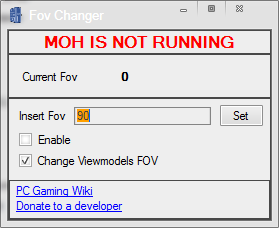
Gave 2010 a go and got some decent results with the FOV tool from PC Gaming wiki. Another good one with pretty clean Unreal Engine G3D.
Medal of Honor 2010 (G3D)
The FOV Changer makes full world and viewmodel FOV possible, however it only applies to the currently selected weapon. Since it grows tiresome to reset for each new gun, I’ve opted to combine with forced G3D enhancement for viewmodels. This introduces pop-in culling around peripheral view, but keeps both FOVs correct all the time. I think it’s worth it, and not so bothersome as to kill the overall experience.
– Download the FOV Changer here. Looks like this:
– run FOVChanger.exe, uncheck Viewmodels, check Enable, enter 97
– wait to click Set button until you’ve launched the games splash screen, or anytime once you’ve started the game. Now you are good to go.
– use a 16:9 resolution to hide more culling (1920×1080)*G3D Shadow treatment toggles crosshair, set Auto for acog scopes fix
*Singleplayer version only
*If you get “General Protection Errors” first time, reinstall PhysX drivers from:
Origin Games\Medal of Honor\__Installer\DISK1\PhysXI think I’ve disabled all undesired shadows and textures halfway through, but will update the profile if more are discovered. Made it past the ATV night mission, pretty neat so far. Enjoy.