@steph12 That is awesome you have prescription lenses for your HMD! I didn’t even know you could get that until now! 😃 thanks! I will have to look into this… 👀😎
alright, thanks ^^
is it worth it to get odyssey+ over regular htc vive ? i’m looking for something more comfortable, because right now, even with DAS, my htc vive is not comfortable at all, i got this comfort issue since day one (april 2016), tried everything, custom foams, prescription lenses to avoid using my glasses, DAS, custom made extra support to ease the pain around my nose, forehead, my htc vive now looks like a heavy prototype headset :DDDD
i’d really love a new shining comfortable headset.
Men of War (G3D)
Something different (and no, i havent given the game a dollhouse look on purpose).
This game behaves very different to anything ive seen so far concerning 3D strength, i am not quite shure if VorpX is responsible for that, but at a very certain zoom state (mousewheel) 3D strength makes a jump so the game (alomost, i have event that out a bit) looks like a dollhouse. If you dont like that effect, turn down 3D strength, but when zoomed in 3D strength will be relatively low.
Let me know how this game looks in your eyes.
– Unusual 3D behave when zooming (in a positive way)
– All together nice S3D
– Terminate game manually after shotdown from taskmanager
– Optimized for cinema modes
– Profile available from the cloud


Not entirely VorpX related, but this will help a lot of people. I found this:
https://steamcommunity.com/app/719950/discussions/0/3276824488715073552/?ctp=3
I thought the display was good on the Odyssey+ before doing this. Wow, huge improvement. VorpX games look even better now. I can’t even imagine going back to my Vive after this.
Game performance is the same as before.
Judder wise there is no difference for Rift and with Vive you get less judder than before. Vive was broken before with the latest SteamVR version. Technically Vive and Rift work below 45fps, even 30fps seems passable, although that’s not exactly great of course.
For Windows Mixed Reality headsets there still is severe judder between 45fps and 90fps unfortunately with the latest SteamVR version. I’m testing additional changes for WMR headsets currently. Looks good so far, but WMR will still need 45fps minimum to be judder free, no way around that. The WMR related changes will be made available as soon as possible.
Thank you, no problem take your time. yes 1.1.4. last info: Odyssey+ is now better to some extent (test new version) by turning fluid sync off. Now it reports 90/90 again. but if it drops frames with a lot of cars it’s not reprojecting in new version and gets juddery.
I think the issue could be that fluid sync is not kicking in new version even when you force it on for WMR, pimax. When the frames drop in the 18.3.1 version it’s still buttery smooth. I still have to test the Vive and rift.
Edit: Also try out the cloud profile called [rocket league] by rocket league when you do test. It’s very nice!
I guess my point is I want the best quality image I can get, I would think resolution helps with looking at objects in the distance especially. I’m totally fine with running 15-20 year old games on a higher quality screen rather than running newer ones where I’m still noticing the screendoor, lack of detail on the horizon, etc.
You’re right to wait on the Pimax 5k+ since it’s not even out for most people, I’m waiting for more reviews to roll in on that.
In light of a recent discussion I have a small request to make.
I usually try to give detailed answers and explanations here, more open and detailed than you get in most other places from developers. However, I can only continue to do so if you are willing to accept answers for what they are even if you would rather have gotten a different one.
The only alternative would be replying in a corporate feelgood style that you get most of the time online, essentially saying as little as possible to not potentially step on anyone’s toes.
Not a good alternative in my view, so here’s the deal: I continue to answer directly and openly whenever possible, in turn you have to accept an answer for what it is even if occasionally it may not be the answer you wanted to hear. That’s the only way this can work, not everything can be discussed ad infinitum.
I’m looking forward to continue to reply to all your questions, wishes and remarks in that spirit.
As far as I’m aware that should be relatively easy with Trinus which provides SteamVR support for PSVR. vorpX can also be used in SteamVR mode, so both should work fine together.
Here’s a tutorial posted by a user some time ago. Rather old, so if anything changed since then, it probably only got even easier.
PlaystationVR+Vorpx Tutorial
For the sixth(?) time: the max is the max not because I want to annoy you, but because you get split images with nearby objects before even reaching that limit.
I sympathize with you wanting “more depth”, that just makes no sense. Neither in regard to realism (see above), nor – more important – technically because the current max is already beyond what works.
As explained about five times the current max. is set not because I want to annoy you, but because you get split images with nearby objects before even reaching that limit. I sympathize with you wanting “more depth”, that just makes no sense at all. Neither in regard to realism, nor – more important – technically because the max is already beyond what works.
You can probably imagine that otherwise the limit would be raised immediately just to end this discussion. That just makes no sense.
That’s the answer I can give you. I explained in great detail and with great patience the reasoning behind this several times. Even tested one of your games for you, which works perfectly fine. That’s all I can do.
I just checked AC:Unity for you to be extra sure I don’t tell any nonsense here. With default settings (not even tweaking FOV) and just moving the the screen closer it is no problem to make the world look a lot smaller than real by setting the 3D-Strength to the max. – which means it has “more depth” than you get in reality.
If you tweak the FOV to be higher to match the screen being ultra close to your face, that’s even more the case.
To get a realistic scale/depth (again: both are the same thing), you do not need more than the 5.0 max depth in this situation, in fact you need less. Again: that’s how stereo vision works. It’s math, physics, whatever you want to call it, it’s not opinion, taste or anything even remotely close to it.
If realistic scale/depth is your goal, it’s no problem at all to achieve that with the available range.
Thank you for checking on it, but listen, let’s be logical:
We both our have our own perceptions of what is real, we see 3D every day in our lives. If a person or apple or whatever is in front of me, I know about how much depth it has, etc.
Yes, of course this is all based on math. So if one person is seeing something with the same settings and says it’s way too flat, and the other person sees it and says it’s perfect, that means there is an EXTRA VARIABLE involved. It could be me having a DK2 instead of a CV1 is the problem (I hope it is). The fact that 5.0 depth is BARELY on the edge of correct depth to me says something is obviously different on my end. Believe me, I’m GLAD to find out if it’s a special issue on my end that can be remedied.
In other words 2 + 2 always equals 4. However 2 + 2 + X does not always equal 4. I’m trying to determine what’s so different on my end that 5.0 is at the very edge of acceptability on my VR set. Again, I’m hoping it’s my headset itself.
I just checked AC:Unity for you to be extra sure I don’t tell any nonsense here. With default settings (not even tweaking FOV) it is no problem to make the world look a lot smaller than real by setting the 3D-Strength to the max, even with the screen moved closer. Which means there is “more depth” than you would see if you physically were in real Paris looking at it with your own eyes.
If you raise the FOV to account for the screen being ultra close to your face, that’s even more the case.
To get a realistic scale/depth (remember: both are the same thing), you do not need more than the 5.0 max depth in this situation, in fact you need less. Again: that’s how stereo vision works. It’s math, physics, whatever you want to call it. It’s not opinion, taste or anything even remotely close to it.
If realistic scale/depth is your goal, it’s no problem at all to achieve that with the available range in this game with your tweaked FOV and screen distance.
Thanks. For those coming late to the party: that’s exactly the reason why the max is where it is. Any realism discussions aside, you get split images with nearby objects before the max. value is even reached, so essentially it’s already higher than it should be.
@Ralf No, that’s exactly what I mean.
I played SiN Episodes: Emergence recently, and I noticed that at the game’s default FOV (in Cinema mode), things looked about right at 5.0 but everything was a little too flat. If I increased the FOV, the depth started looking about right, but then everything was a little too tiny, like a doll, exactly as you’re describing.
I noticed the same effect in Assassin’s Creed Unity. I probably need to test more games since my memory is blurry on others. If there are any games you would suggest as a reference (preferably older ones, I don’t own many brand new games) that you think look perfect at less than 5.0 depth in cinema mode, I’d be very interested to know.
It could be I’m completely wrong on all this, but in my experience, it was the FOV increasing the dollhouse look, not the depth.
EDIT: I found a screenshot demonstrating the “dollhouse shrinkage” effect you get from increasing the FOV:
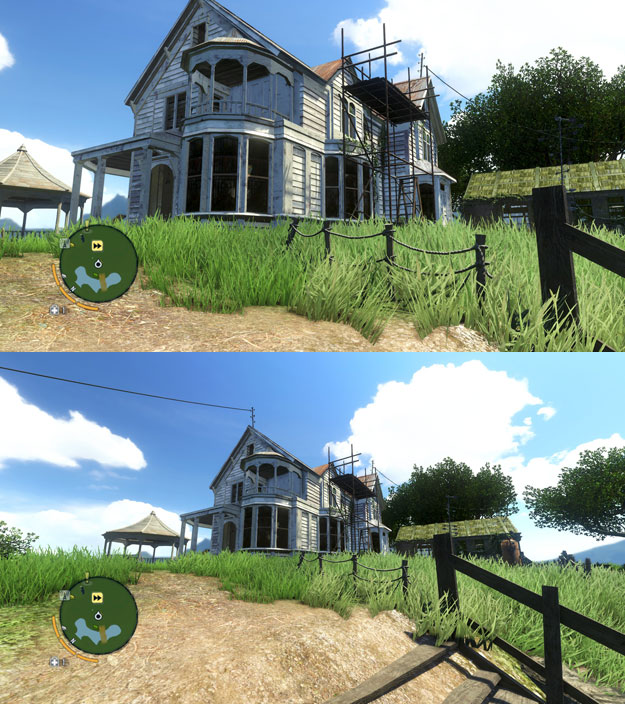
My understanding was the depth values were a separate value that didn’t cause that effect, just the relative distance the objects were from the camera.
@Stryker_66
I’m kind of surprised the Z buffer mode is offered at all. In everything I’ve tested it on, the effect was so weak it just wasn’t even worth running in my opinion. Have there been any games Z buffer mode does a great job with depth on?

