Thank you for everything Ralf. I am loving playing with my DK2 with vorpx. I went through the entirety of Bioshock Infinite with vorpx on my DK1 and it was my best vr experience and I am reinstalling it for uses on the DK2 now.
I spent some time playing bioshock infinite myself…I ended up disabling the dynamic shadows because apparently the game produced different shadows on the left than the right eye making some people and objects look a little wierd. There are still static shadows in the game so it wasn’t too bad.
I thought BIOSHINF was the shit until I tried Call of Duty Modern Warfare 3, there are underwater sequences where you take over a sub and then turbulence aboard an airplane…you really need to give it a go. I actually liked it better than BIOSHINF. However it does have some minor display issues like for some reason while looking around you might see a ghost halo effect on the left or right of some objects…the same happens in Mirror’s Edge but the 3D effects are so good they are easily ignorable. Ralf, if you are reading this…will you be customizing COD MW3 and Mirrors Edge at some point so that they will be as good as Bioshock Infinite without those ghost halo outlines appearing around some objects, or is that a problem with the particular game engine?
Hey there :)
I hope I can describe my problem…
I try to get Mirrors Edge to work.
The mouse is used to look around (left/right) but is disturbing when you move the mouse up/down because you end up looking straight forward in real life but up or down in game. The solution could be to disable the mousemovement in the up/down-direction. Am I missing an option somewhere?
Btw: In Optimize Settings there is a profile for Mirrors Edge. The suggested FOV setting is 120 but 130-140 works for me best. In case anyone is trying that out :P
I have own all mentioned games in Steam. So there is no problem with that. Also I used F keys only in games which VorpX configuration said they are supported. So I made a test. I tried to bind keys for Mirrors Edge according to this proceed: http://steamcommunity.com/sharedfiles/filedetails/?id=138177233. But my num case doesn’t change the FOV. Minimal I wasn’t see the difference in in-game menu. So maybe I have a problem which is not connected with VorpX.
OK. My problems with VorpX 0.7.1:
1. I have 4 monitors (including DK2). My DK2 is set as monitor 2 and is situated on the right side of main one. When I set displaying game only to DK2, it display it to monitor number 3. I had to set displaying on monitor 3 to get rendering on DK2 (which is monitor 2).
2. When I run any of the supported game, in the begining there is no head tracking applying to image, in some cases it works only to move with game cursor. After I press DELL to display VorpX menu, everything works fine. When I close VorpX menu, I have no tracking again. Becasue of this, there is for example no possibility to calibrate IPD when whoe image is moving with my head or I don’t see game menu items, when they are left or right.
3. I have no 3D effect in games. I tried Bioshock Infinite, Mirrors Edge and Skyrim. I see only 2D image disturbed around me. Tracking is working well but I get flat result.
I checked my setting and they are good according to manual. What can be wrong? Thanks for answer Ralf.
Marek
I just got my DK2 today. and at the moment it does not work at all with the three games I’ve tried in “Direct HMD Access from Apps” mode (ARMA III, Mirrors Edge, and Skyrim). And it has major problems in “Extend Desktop to the HMD” mode. In ARMA III, the game launches, but the game is not projecting two images and there seems to be problem with the colors as well. I also can’t access the in game menu because my mouse wont travel to that part of the screen for some reason. In Mirrors Edge the game just doesn’t launch after a “Head tracking init failed” error. In Skyrim it gives that same head tracking error as well as “failed to initialize renderer”.
I was so excited when it arrived today, but now I am bummed because I can’t get a single game to work on it.
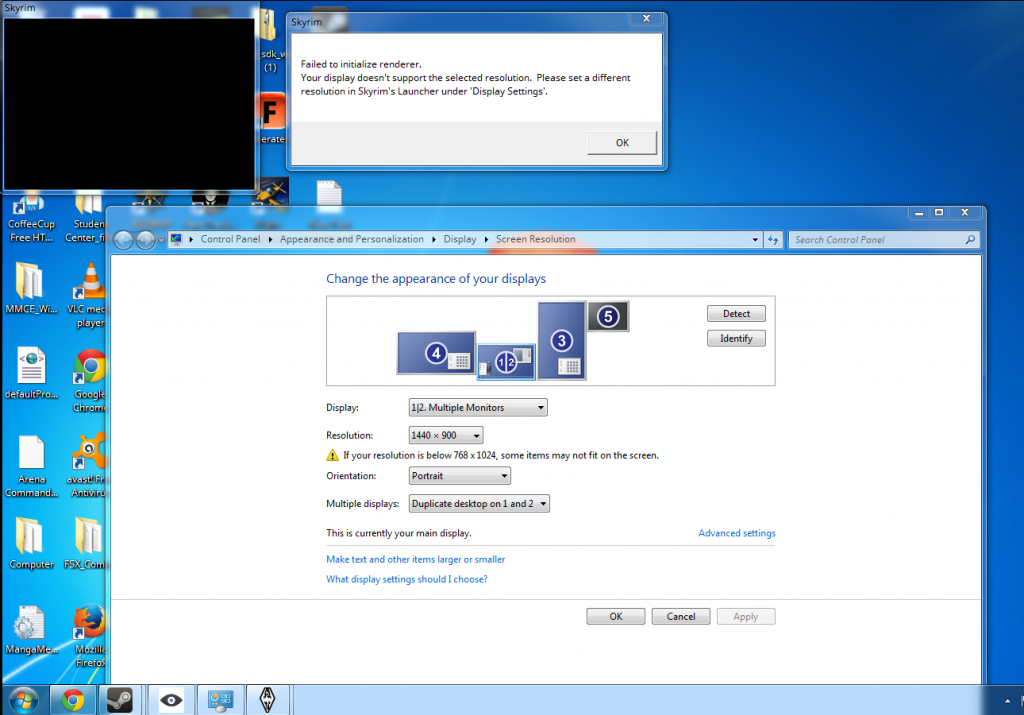
So, I followed the instructions and tried turning off MSI and Shadowplay, and it didn’t work. I did however kept them off and uninstalled and reinstalled Mirrors edge, and that got it to work! I will post later when I have time to see if Shadowplay and MSI interfere at all with VorpX. Thanks for the help Ralf.
Hey guys, I recently purchased a new computer and I tried to use VorpX with it. As I followed as many instructions on the FAQ I still cannot get the game Mirrors edge to work (I did a direct game shorcut launch with VorpX also). I have a little bit of video, but it Goes back to Windows desktop shortly after. when I try to switch back it gets unbearably laggy, flashes black more than it shows anything, and then switches back to windows anyways.
Here is a little video, but it mostly now just goes black and slightly plays music.
https://www.youtube.com/watch?v=neKNl_-3DJ0&feature=youtu.be
Here is a picture link with my specs also:
http://www.tiikoni.com/tis/view/?id=9199249
And what I have configured both with VorpX, my screen resolution and adapter:
http://www.tiikoni.com/tis/view/?id=dc3fbf2
It worked quite well on my last computer, but the last computer was so weak I never could effectively play it.
Any help would be greatly appreciated please.
Did you try both the DX9 and the DX10 mode? Both *should* work (DX10 only partially though), but maybe for you at least one of the two does the trick.
You also might want to try hooking with a special vorpX shortcut, which I described here:
Cant get Mirror's Edge and Metro Last Light to work.
I’m not having any of the issues that you mentioned. I’ve tried Bioshock infinite and Far cry 3 with no issues. Also skyrim and fallout 3. I haven’t tried Mirrors edge jet, but I’m installing it now.
My system specs are sorta similar. I7, GTX580 (320.49), win7 64 bit.
However as I’ve only recently got my Oculus I’ve never bothered to install Vireio or similar software. Is there a possibility that Vireio is somehow inhibiting the performance of the VorpX drivers?
Thanks for the reply but I still cant get Mirrors Edge to be recognized by vorpX. It just boots up normally no matter how I launch the game. Every other supported game works fine for me.
Metro is working now (I have no idea why) but it lacks any 3D.
Mirrors Edge ist still not beign recognized by VorpX.

