-
Search Results
-
Good morning all,
I have reciently been trying to get ue4 games running in vr
I can get good G3d but positional tracking, while it can be unlocked
Causes alot of visual/lighting bugs,
Would anyone have any hints,or tips to minimise the unwanted effects?
Thank you in advance for any help or advice
Topic: Alpha Protocol
Alpha Protocol – (G3D)
Works real well in immersive mode. Disable dynamic shadows in game menu since shadows do not render correctly. My other in game menu settings:
– Motion blur off, why developers use this beyond me, terrible effect
– Depth of field off , another crappy effect
– Distortion off
– Vsync offI am using a resolution of 3840×2880 4:3 and performs great. Profile uploaded to the cloud and simply based on the unreal 3 game engine. I am using a strong G3D setting with a wide FOV. Edgepeek G3D is left on since most screens look good in this way. I prefer using the VorpX G3D hot key to turn off the G3D only a few screens. The head tracking sensitivity is set to 0 so I can turn my head independently from the mouse or character movement. Great for this type of game. Either way, you can change your VorpX settings as you see fit. Fun game in G3D, reminds me a bit of the Splinter Cell series.
Cheers,
Stryker
i tried many profiles, but while the game hooks with some of them, there is no Z3D.. let alone G3D, i heard performance is not really good on flat screen, so for now G3D is probably a no go, but Z3D would be great !
so if anyone here manages to make it works in Z3D, please let us know :D
it’s an unreal engine 4 game btw.
If you are new to vorpX, you probably want to hop right into the action instead of learning how to configure vorpX. The list below contains first person games that work with litlle to no configuration in ‘Full VR’ due to vorpX’s DirectVR functionality, which can configure important things like field of view, head tracking or resolution automatically.
For third person games that are usually played best in immersive screen or cinema mode not much configuration is required in general, so this list focuses on first person ‘Full VR’ games that can be a little harder to configure without DirectVR.
If you are stuck, make sure to check the ‘Essential Hints Guide’ and the ‘Quick Reference’ in the help. They help you understand a few basic concepts.
Metro 2033
Metro Last Light
Kingdom Come Deliverance
Half-Life 2
Portal
Portal 2
Cyberpunk 2077
Left 4 Dead 2
Black Mesa Source
The Stanley Parable
Prey [2017]
Mirror’s Edge
Deus Ex: Human Revolution
Thief [2014]
Get Even
Dishonored
Aliens: Colonial Marines
Oblivion
Fallout 3
Fallout New Vegas
Fallout 4
Fallout 76
Skyrim
Outlast
Outlast 2
Crysis
Crysis 3
The Hunter: Call of the WildTitanfall
Titanfall 2
Conan Exiles [no BattleEye]
ArmA III (no BattleEye)
Far Cry
Far Cry 2
Far Cry 3
Far Cry 4
Far Cry Primal
F.E.A.R
F.E.A.R 2
Shadow Warrior [2013][DX9]
Shadow Warrior 2
The Talos Principle
Unreal Tournament 3
Bulletstorm Full Clip Edition
Conarium
The Turing Test
Hard Reset [original version]
Farming Simulator 2017
Gone Home
Dear Esther (original Source engine version)
Quake 3
Quake 4
Tron 2.0
Deadfall Adventures
Star Wars: Jedi Knight II
Star Trek Voyager Elite ForceTopic: The Fidelio Incident – No 3D
Hi guys,
The game uses Unreal Engine 4 but used a few profiles without any 3D at all.
Tried so far :* Vampyr
* Conarium
* Conan ExileAny other options should I check?
Will try to do another try but this makes me sad!!!
>observer_ is a cyberpunk horror game made by the creators of the Layers of Fear. While it is not a known game, it has very high reviews, it is a hidden gem. You could add -vr at launch settings and it would work for the Rift, but they “fixed” this with a patch. It is a Unreal Engine 4 game, so would it work with vorpX? There are many people in its official steam forums who want VR support for this game, but the developers are silent. It is a great atmospheric game, so I think it would be great if it was one of the official supported games from vorpX. There is also a %50 discount on Steam right now.
Topic: Medal of Honor 2010
============================================================
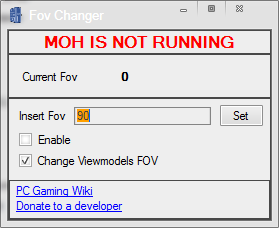
Gave 2010 a go and got some decent results with the FOV tool from PC Gaming wiki. Another good one with pretty clean Unreal Engine G3D.
Medal of Honor 2010 (G3D)

The FOV Changer makes full world and viewmodel FOV possible, however it only applies to the currently selected weapon. Since it grows tiresome to reset for each new gun, I’ve opted to combine with forced G3D enhancement for viewmodels. This introduces pop-in culling around peripheral view, but keeps both FOVs correct all the time. I think it’s worth it, and not so bothersome as to kill the overall experience.
– Download the FOV Changer here. Looks like this:
– run FOVChanger.exe, uncheck Viewmodels, check Enable, enter 97
– wait to click Set button until you’ve launched the games splash screen, or anytime once you’ve started the game. Now you are good to go.
– use a 16:9 resolution to hide more culling (1920×1080)*G3D Shadow treatment toggles crosshair, set Auto for acog scopes fix
*Singleplayer version only
*If you get “General Protection Errors” first time, reinstall PhysX drivers from:
Origin Games\Medal of Honor\__Installer\DISK1\PhysXI think I’ve disabled all undesired shadows and textures halfway through, but will update the profile if more are discovered. Made it past the ATV night mission, pretty neat so far. Enjoy.
@ sapolettos: Just a lot of trying each of Ralf’s profiles until you get lucky :) . The shader tool he provided has been a big help too. Loving it.
Had some more fun playing at war this weekend. A couple more G3D shooters you might enjoy.
Medal of Honor: Warfighter (G3D)

I had to force a lot of 3D enhancement to make up for hardcoded FOV (causing environment culling around periphery), but once in the action I was soon not bothered by it. It’s got some intense set-piece shootouts that feel neat in 3D, so I’ve decided to share the profile anyway. I did manage to reduce HUD and offensive shadows, so worth a go if you own the game. Probably my new favorite modern military shooter.
– use a 16:10 resolution (2880×1800) in fullscreen
*Use hotkey “switch G3D/Z3D” for door breaching HUD
*2 driving levels crash the hmd, but vorpX automatically rehooks after completion
*Z-normal optional with cinema modeMedal of Honor: Airborne (G3D)
Now this one is working great! I spent most of the weekend adjusting FOV code for each weapon, and it has pleasantly paid off. Very good G3D, flawless FOV, it all just feels right. Shooting is very punchy and physical, and combat action very intense. A must try in VR for war shooter fans.
– download FOV files. Place them marked “read only” into:
Documents\EA Games\Medal of Honor Airborne(tm)\Config– use game launcher to set 4:3 resolution (1600×1200)
steamapps\common\Medal of Honor Airborne\UnrealEngine3\Binaries\moha_setup.exe
(click play to apply, may give expected load error)– from now on, launch as usual via steam etc.
– press Q to trigger FOV at beginning of each briefing and airdrop (also toggles HUD)*If scopes or mounted guns break FOV, ADS with unscoped weapon to fix
*Getting smoked? set steam launch parameter “-enableconsole” and type “god”
*If Q key fails, use console command “fov 120” to set FOV at start of each missionTopic: Breed