@ Du1g0 : That hint was pure gold! I spent hours with this thing shortly after release without getting anywhere…
Don’t get overly excited yet, but if all goes well I *might* have a working profile later today.
Hahaha. It is always great that credits goes to someone else :-D
By the way Ralf, this line of configuration edit should be the same for another RE Engine title : Devil May Cry 5.
As far as I know, you have to write the line inside the config file (it is not even there in the ini file). But after writing it, it should be fixed.
I will try it with the same RE 2 cloud profile and the change in the ini file.
Cheers,
Mankind Divided
Far Cry 5
Shadow of Tomb Raider
AC Odyssey
(All quite amazing with Cinema mode btw)
Far cry 5 works now? Which profile?
Thanks again for replying. I just did a little bit of testing. I checked steam and all sync options are turned to off.
Started Far Cry 2 up. When i got in game i was running at 45 fps ( in both headset and game). I hit alt tab and then again to get back in to the game and instantly both fps values went up to 90 and stayed there. So just alt tab is fixing it.
The problem happens every time i start the game so it is a reproducible problem but it also happens randomly while playing which is odd.
Il have to do more testing, perhaps it is games that are run in fullscreen only. I have only recently started getting the problem though which is also odd.
someone had a post saying that Farcry 5 is supported.Is far cry 5 supported now???
I’ve been playing BFV, GTA 5, Far Cry 5, and APEX with the Rift S.
Doesn’t farcry:new dawn have the same anti-cheat issues that farcry 5 has? I haven’t been able to play farcry 5 at all in any 3D.
Great news that VORPX finally supports Pimax 8K (in may case). I just want to point out some configs if Ralph is willing to check it out:
– Fixed Foveated Rendering(FFR); support it please, for better performance, Smart Smoothing works perfect with VORPX.
– Immersive mode; needs more zoom in, right now it looks like cinema mode.
– Cinema mode needs vertical axis control.
For those who does not know:
– For better resolutions; config in game (menu settings), leave alone steam VR config.
– For better FOV; the same, config (ini files if necessary) games settings. Depending of your Pimax view mode (small 130, medium 150 or large 170).
I had done those setting in AC Odyssey, Bioshock 1 & 2, Farcry Primal and it looks fantastic.
Thanks Ralph.
Far Cry 5 will likely never get official support, unless one day EasyAntiCheat adds vorpX to the whitelist.
I know this is an old post but damn i’m glad he was wrong. I do hope EAC will add VorpX to the whitelist soon.
Hi look for a trainer.And your reward will be a Z3d far cry 5 vorpy experience
farcry 5 and dlc has anticheat system is ruining the hooking vorpx method.
it just doesnt work i believe.
I’ve spent a little longer than I care to mention trying this out, it seems everything except stereo vision works.
Tried basing on the top rated FC5 profile from the cloud, and the official FC primal profile, also checked all 3d vision modes and an alt+L rescan with no luck.
Spotted nvidia 3dvision fixes mentioned for primal, which may be needed for it to have stereo with vorpx.
Feeling a little lost at the mo. Will check into other options and report back here if I get it working
Hi
1. I Manage to play some of the new games that not work in basic vorpx with vorpx desktop like far cry 5 , forza horizon 4 and more .
but when i play those game on virtual desktop of vorpx the frame rate in the headset slow when on screen is fast , there is any way to fixed the low fps?
2. I try to use the vorpx emulator for Xbox controller to use as head tracking but it don’t work (sometime use mouse emulator as head tracking is disturbed the real Xbox controller )?
Thank you very much
I don’t have time for details atm, but google for Flawless Widscreen. It’s an app to adjust FOV for several games, FC3 is on there. Think it even has hands FOV adjustment.
Also, I often use Letterbox in fullVR for these situations, and zooming the screen out some. Yes I get bars on top and bottom, but I still get headtracking and larger scale than playing in the cinema modes.
Sometimes getting proper FOV (distance from player hands/weapons and from the ground) are more important to me than the image filling my entire view, to get it “feeling” right.
I can’t believe I completely forgot about that program! I used it awhile ago and then just sort of forgot about it, but you are right, it’s like the perfect solution, especially since it works specifically with FarCry 3. Thanks a ton of the suggestion!
@Ralf No, that’s exactly what I mean.
I played SiN Episodes: Emergence recently, and I noticed that at the game’s default FOV (in Cinema mode), things looked about right at 5.0 but everything was a little too flat. If I increased the FOV, the depth started looking about right, but then everything was a little too tiny, like a doll, exactly as you’re describing.
I noticed the same effect in Assassin’s Creed Unity. I probably need to test more games since my memory is blurry on others. If there are any games you would suggest as a reference (preferably older ones, I don’t own many brand new games) that you think look perfect at less than 5.0 depth in cinema mode, I’d be very interested to know.
It could be I’m completely wrong on all this, but in my experience, it was the FOV increasing the dollhouse look, not the depth.
EDIT: I found a screenshot demonstrating the “dollhouse shrinkage” effect you get from increasing the FOV:
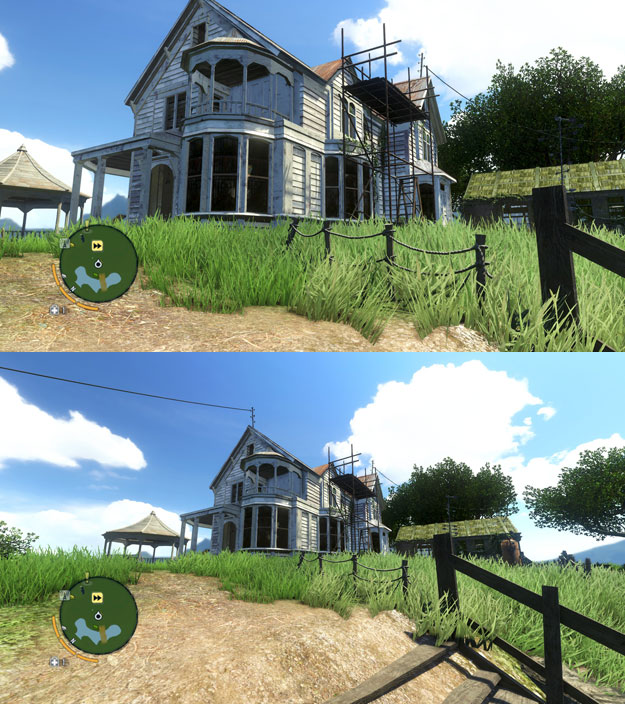
My understanding was the depth values were a separate value that didn’t cause that effect, just the relative distance the objects were from the camera.
@Stryker_66
I’m kind of surprised the Z buffer mode is offered at all. In everything I’ve tested it on, the effect was so weak it just wasn’t even worth running in my opinion. Have there been any games Z buffer mode does a great job with depth on?

