
-
AuthorSearch Results
-
Nov 23, 2018 at 1:24am #176956
Topic: Outcast – Second Contact
in forum User Profiles zahncistenParticipant
Outcast – Second Contact in G3D! Looks awesome. Try it out!
Right now, its free (DRM free and free free, lol, as in no money free) on Humble: click here!
Nov 22, 2018 at 10:17am #176942In reply to: 3rd person games play great with Vorpx + VR
RJK_ParticipantIve updated my personal profile list so someone can do a genre research an that, If i get enough feedback through the Engine List (i just dont know every game, please send a short message like “Witcher 2, 3rd Person, RPG ect. ) i will then create a genre research for the official profiles as well.
Nov 15, 2018 at 3:43pm #176739zahncistenParticipant@ lipplog I just uploaded a profile for Warhammer 40,000: Space Marine which pretty much fits the concept of non-stop action games. Plus, Space Marine is on sale as a humble bundle for pretty cheap.
Nov 9, 2018 at 9:08am #176591In reply to: News on DGVoodoo 2
RJK_ParticipantIf you are using the vive do this. Note: If you dont see 3D in your HMD, you probably wont see it in an SBS screenshot either.
Nov 6, 2018 at 1:30pm #176523In reply to: Dreamfall: the longest journey
gilad10ParticipantGlad you like it ! I enjoyed the game very much too.
I very carefully adjust my profiles, always for G3D, so you can expect almost every profile to deliver a nice S3D (exept a few very old ones).
If anyone is interested, for a short overwiew about the profiles i have created so far including a stereo image preview you can have a sneak here if you like.Thank you RJK_ !
I use your profiles all the time and really enjoy them ! especially the profile of Monsters VS aliens. look so good in vr!
For some reason your DREAMFALL game profile is not working for me, it says the profile is outdated ???Nov 5, 2018 at 10:48pm #176512In reply to: Dreamfall: the longest journey
RJK_ParticipantGlad you like it ! I enjoyed the game very much too.
I very carefully adjust my profiles, always for G3D, so you can expect almost every profile to deliver a nice S3D (exept a few very old ones).
If anyone is interested, for a short overwiew about the profiles i have created so far including a stereo image preview you can have a sneak here if you like.Oct 29, 2018 at 2:36pm #176257In reply to: Can't get stereoscopic 3D to work (e.g. LiS:BtS)
VV00ParticipantResetting didn’t help.
When I cycle through the 3D reconstruction settings (geometry, z-adaptive, z-index, off), they all look the same. There’s a flat screen without depth hovering in front of some kind of (also flat) illumination (?) effect in the background. Mentioning this as it seems to be specific to this game, it isn’t in Tomb Raider for example.
That’s in immersive screen mode, cinema mode and Full VR don’t have that but they aren’t stereoscopic either.
Oct 7, 2018 at 4:32pm #175706Topic: Viewing Stereo Images with vorpX
in forum Game Hints and SettingsRJK_ParticipantI tested a few applications in the past but all of them were too difficult to handle, didnt work at all or headtracking wasnt availiable.
I wrote earlier in the forum about Stereo Photo Maker,a free program, but there were too many things to prepare to get it working. Now i have a preconfigured settings file that you can download and you can wiew stereo pictures right away.
please read more HERE
Beside others i also tested Sview , also a free program, interesting if you dont have VorpX yet and just want so sneak into how some users screenshots look like, but it has one big disadvantage, it doesnt provide headtracking which can be very annoing.
VorpX together with Stereo Photo Maker does.
 Sep 18, 2018 at 11:37pm #175387
In reply to: settings for unreal 4?
Aug 17, 2018 at 10:48am #174788In reply to: Old User Profile Thread
RJK_ParticipantImportant Note #2 on Call of Cthulhu
I was not aware of that this game is out in 2 different Directx versions.
The profile above (marked in the cloud with DX9) is for the DX9 game only
If you have the DX8 game, you can try DGVoodoo 2. Make a copy of the dgvoodoo2 profile for that.Here you can do a research on the different versions.
For the DX9 profile i was using ISBN: 4020636230004
Sorry for the inconvenience.
Aug 13, 2018 at 7:56am #174714In reply to: Star Citizen
BrewnixParticipantOk I completely agree thanks for posting! There is something running that is hooking it before Starcitizen can. So I found this trbl shooter in Vorpx is this a good indication of what running
I’ll post this here the list and can you help me determine which program should go. The tech link you posted I have read multiple times. I have not used any of the overlay programs and only antivirus is windows defender so i am thinking it has
something to do with a DX DLL like it suggest! What I did for clarity, I rebooted computer started vorpx and hit the trbl shooting button. And this is what it gave me! Thanks for the help I would like to get this working. I am just a little slow on Windows 10 as I just moved over from Win 7. Thx!“vorpX_procs”
[Prog] ApplicationFrameHost.exe | full path: C:\Windows\System32\ApplicationFrameHost.exe
[Prog] browser_broker.exe | full path: C:\Windows\System32\browser_broker.exe
[Prog] conhost.exe | full path: C:\Windows\System32\conhost.exe
[Prog] conhost.exe | full path: C:\Windows\System32\conhost.exe
[Prog] ctfmon.exe | full path: C:\Windows\System32\ctfmon.exe
[Prog] dllhost.exe | full path: C:\Windows\System32\dllhost.exe
[Prog] explorer.exe | full path: C:\Windows\explorer.exe
[Prog] LockApp.exe | full path: C:\Windows\SystemApps\Microsoft.LockApp_cw5n1h2txyewy\LockApp.exe
[Prog] MicrosoftEdge.exe | full path: C:\Windows\SystemApps\Microsoft.MicrosoftEdge_8wekyb3d8bbwe\MicrosoftEdge.exe
[Prog] MicrosoftEdgeCP.exe | full path: C:\Windows\SystemApps\Microsoft.MicrosoftEdge_8wekyb3d8bbwe\MicrosoftEdgeCP.exe
[Prog] MicrosoftEdgeCP.exe | full path: C:\Windows\SystemApps\Microsoft.MicrosoftEdge_8wekyb3d8bbwe\MicrosoftEdgeCP.exe
[Prog] MSASCuiL.exe | full path: C:\Program Files\Windows Defender\MSASCuiL.exe
[Prog] nvcontainer.exe | full path: C:\Program Files\NVIDIA Corporation\NvContainer\nvcontainer.exe
[Prog] NVIDIA Web Helper.exe | full path: C:\Program Files (x86)\NVIDIA Corporation\NvNode\NVIDIA Web Helper.exe
[Prog] OVRRedir.exe | full path: C:\Program Files\Oculus\Support\oculus-runtime\OVRRedir.exe
[Prog] OVRServer_x64.exe | full path: C:\Program Files\Oculus\Support\oculus-runtime\OVRServer_x64.exe
[Prog] RtkNGUI64.exe | full path: C:\Program Files\Realtek\Audio\HDA\RtkNGUI64.exe
[Prog] RuntimeBroker.exe | full path: C:\Windows\System32\RuntimeBroker.exe
[Prog] RuntimeBroker.exe | full path: C:\Windows\System32\RuntimeBroker.exe
[Prog] RuntimeBroker.exe | full path: C:\Windows\System32\RuntimeBroker.exe
[Prog] RuntimeBroker.exe | full path: C:\Windows\System32\RuntimeBroker.exe
[Prog] RuntimeBroker.exe | full path: C:\Windows\System32\RuntimeBroker.exe
[Prog] SearchProtocolHost.exe | full path: C:\Windows\System32\SearchProtocolHost.exe
[Prog] SearchUI.exe | full path: C:\Windows\SystemApps\Microsoft.Windows.Cortana_cw5n1h2txyewy\SearchUI.exe
[Prog] SettingSyncHost.exe | full path: C:\Windows\System32\SettingSyncHost.exe
[Prog] ShellExperienceHost.exe | full path: C:\Windows\SystemApps\ShellExperienceHost_cw5n1h2txyewy\ShellExperienceHost.exe
[Prog] sihost.exe | full path: C:\Windows\System32\sihost.exe
[Prog] smartscreen.exe | full path: C:\Windows\System32\smartscreen.exe
[Prog] svchost.exe | full path: C:\Windows\System32\svchost.exe
[Prog] svchost.exe | full path: C:\Windows\System32\svchost.exe
[Prog] svchost.exe | full path: C:\Windows\System32\svchost.exe
[Prog] taskhostw.exe | full path: C:\Windows\System32\taskhostw.exe
[Prog] vorpConfig.exe | full path: C:\Program Files (x86)\Animation Labs\vorpX\vorpConfig.exe
[Prog] vorpControl.exe | full path: C:\Program Files (x86)\Animation Labs\vorpX\vorpControl.exe
[Prog] vorpControl64.dat | full path: C:\Program Files (x86)\Animation Labs\vorpX\vorpControl64.dat
[Service] armsvc.exe | full path: C:\Program Files (x86)\Common Files\Adobe\ARM\1.0\armsvc.exe
[Service] ICCProxy.exe | full path: C:\Program Files (x86)\Intel\Intel(R) Integrated Clock Controller Service\ICCProxy.exe
[Service] igfxCUIService.exe | full path: C:\Windows\system32\igfxCUIService.exe
[Service] LocalSystem” | full path: C:\Program Files\NVIDIA Corporation\Display.NvContainer\NVDisplay.Container.exe” -s NVDisplay.ContainerLocalSystem -f “C:\ProgramData\NVIDIA\NVDisplay.ContainerLocalSystem.log” -l 3 -d “C:\Program Files\NVIDIA Corporation\Display.NvContainer\plugins\LocalSystem” -r -p 30000
[Service] lsass.exe | full path: C:\Windows\system32\lsass.exe
[Service] lsass.exe | full path: C:\Windows\system32\lsass.exe
[Service] lsass.exe | full path: C:\Windows\system32\lsass.exe
[Service] LSM | full path: LSM
[Service] MsMpEng.exe | full path: C:\ProgramData\Microsoft\Windows Defender\platform\4.18.1807.18075-0\MsMpEng.exe
[Service] NisSrv.exe | full path: C:\ProgramData\Microsoft\Windows Defender\platform\4.18.1807.18075-0\NisSrv.exe
[Service] NvContainerTelemetryApi.dll | full path: C:\Program Files\NVIDIA Corporation\NvContainer\nvcontainer.exe” -s NvContainerLocalSystem -f “C:\ProgramData\NVIDIA\NvContainerLocalSystem.log” -l 3 -d “C:\Program Files\NVIDIA Corporation\NvContainer\plugins\LocalSystem” -r -p 30000 -st “C:\Program Files\NVIDIA Corporation\NvContainer\NvContainerTelemetryApi.dll
[Service] OVRServiceLauncher.exe | full path: C:\Program Files\Oculus\Support\oculus-runtime\OVRServiceLauncher.exe
[Service] plugins” | full path: C:\Program Files (x86)\NVIDIA Corporation\NvTelemetry\NvTelemetryContainer.exe” -s NvTelemetryContainer -f “C:\ProgramData\NVIDIA\NvTelemetryContainer.log” -l 3 -d “C:\Program Files (x86)\NVIDIA Corporation\NvTelemetry\plugins” -r
[Service] PresentationFontCache.exe | full path: C:\Windows\Microsoft.Net\Framework64\v3.0\WPF\PresentationFontCache.exe
[Service] SearchIndexer.exe | full path: C:\Windows\system32\SearchIndexer.exe /Embedding
[Service] SecurityHealthService.exe | full path: C:\Windows\system32\SecurityHealthService.exe
[Service] SgrmBroker.exe | full path: C:\Windows\system32\SgrmBroker.exe
[Service] spoolsv.exe | full path: C:\Windows\System32\spoolsv.exe
[Service] svchost.exe | full path: C:\Windows\system32\svchost.exe -k appmodel -p
[Service] svchost.exe | full path: C:\Windows\system32\svchost.exe -k appmodel -p
[Service] svchost.exe | full path: C:\Windows\system32\svchost.exe -k DcomLaunch -p
[Service] svchost.exe | full path: C:\Windows\system32\svchost.exe -k DcomLaunch -p
[Service] svchost.exe | full path: C:\Windows\system32\svchost.exe -k DcomLaunch -p
[Service] svchost.exe | full path: C:\Windows\system32\svchost.exe -k DcomLaunch -p
[Service] svchost.exe | full path: C:\Windows\system32\svchost.exe -k DcomLaunch -p
[Service] svchost.exe | full path: C:\Windows\system32\svchost.exe -k LocalService -p
[Service] svchost.exe | full path: C:\Windows\system32\svchost.exe -k LocalService -p
[Service] svchost.exe | full path: C:\Windows\system32\svchost.exe -k LocalService -p
[Service] svchost.exe | full path: C:\Windows\system32\svchost.exe -k LocalService -p
[Service] svchost.exe | full path: C:\Windows\system32\svchost.exe -k LocalService -p
[Service] svchost.exe | full path: C:\Windows\System32\svchost.exe -k LocalService -p
[Service] svchost.exe | full path: C:\Windows\System32\svchost.exe -k LocalService -p
[Service] svchost.exe | full path: C:\Windows\System32\svchost.exe -k LocalService -p
[Service] svchost.exe | full path: C:\Windows\system32\svchost.exe -k LocalServiceAndNoImpersonation -p
[Service] svchost.exe | full path: C:\Windows\system32\svchost.exe -k LocalServiceNetworkRestricted -p
[Service] svchost.exe | full path: C:\Windows\system32\svchost.exe -k LocalServiceNetworkRestricted -p
[Service] svchost.exe | full path: C:\Windows\system32\svchost.exe -k LocalServiceNetworkRestricted -p
[Service] svchost.exe | full path: C:\Windows\system32\svchost.exe -k LocalServiceNetworkRestricted -p
[Service] svchost.exe | full path: C:\Windows\system32\svchost.exe -k LocalServiceNetworkRestricted -p
[Service] svchost.exe | full path: C:\Windows\System32\svchost.exe -k LocalServiceNetworkRestricted -p
[Service] svchost.exe | full path: C:\Windows\System32\svchost.exe -k LocalServiceNetworkRestricted -p
[Service] svchost.exe | full path: C:\Windows\System32\svchost.exe -k LocalServiceNetworkRestricted -p
[Service] svchost.exe | full path: C:\Windows\System32\svchost.exe -k LocalServiceNetworkRestricted -p
[Service] svchost.exe | full path: C:\Windows\System32\svchost.exe -k LocalServiceNetworkRestricted -p
[Service] svchost.exe | full path: C:\Windows\system32\svchost.exe -k LocalServiceNoNetwork -p
[Service] svchost.exe | full path: C:\Windows\system32\svchost.exe -k LocalServiceNoNetwork -p
[Service] svchost.exe | full path: C:\Windows\system32\svchost.exe -k LocalServiceNoNetwork -p
[Service] svchost.exe | full path: C:\Windows\System32\svchost.exe -k LocalServiceNoNetwork -p
[Service] svchost.exe | full path: C:\Windows\system32\svchost.exe -k LocalSystemNetworkRestricted -p
[Service] svchost.exe | full path: C:\Windows\system32\svchost.exe -k LocalSystemNetworkRestricted -p
[Service] svchost.exe | full path: C:\Windows\system32\svchost.exe -k LocalSystemNetworkRestricted -p
[Service] svchost.exe | full path: C:\Windows\system32\svchost.exe -k LocalSystemNetworkRestricted -p
[Service] svchost.exe | full path: C:\Windows\system32\svchost.exe -k LocalSystemNetworkRestricted -p
[Service] svchost.exe | full path: C:\Windows\system32\svchost.exe -k LocalSystemNetworkRestricted -p
[Service] svchost.exe | full path: C:\Windows\System32\svchost.exe -k LocalSystemNetworkRestricted -p
[Service] svchost.exe | full path: C:\Windows\System32\svchost.exe -k LocalSystemNetworkRestricted -p
[Service] svchost.exe | full path: C:\Windows\System32\svchost.exe -k LocalSystemNetworkRestricted -p
[Service] svchost.exe | full path: C:\Windows\System32\svchost.exe -k LocalSystemNetworkRestricted -p
[Service] svchost.exe | full path: C:\Windows\System32\svchost.exe -k LocalSystemNetworkRestricted -p
[Service] svchost.exe | full path: C:\Windows\System32\svchost.exe -k LocalSystemNetworkRestricted -p
[Service] svchost.exe | full path: C:\Windows\System32\svchost.exe -k netsvcs
[Service] svchost.exe | full path: C:\Windows\system32\svchost.exe -k netsvcs -p
[Service] svchost.exe | full path: C:\Windows\system32\svchost.exe -k netsvcs -p
[Service] svchost.exe | full path: C:\Windows\system32\svchost.exe -k netsvcs -p
[Service] svchost.exe | full path: C:\Windows\system32\svchost.exe -k netsvcs -p
[Service] svchost.exe | full path: C:\Windows\system32\svchost.exe -k netsvcs -p
[Service] svchost.exe | full path: C:\Windows\system32\svchost.exe -k netsvcs -p
[Service] svchost.exe | full path: C:\Windows\system32\svchost.exe -k netsvcs -p
[Service] svchost.exe | full path: C:\Windows\system32\svchost.exe -k netsvcs -p
[Service] svchost.exe | full path: C:\Windows\system32\svchost.exe -k netsvcs -p
[Service] svchost.exe | full path: C:\Windows\system32\svchost.exe -k netsvcs -p
[Service] svchost.exe | full path: C:\Windows\system32\svchost.exe -k netsvcs -p
[Service] svchost.exe | full path: C:\Windows\system32\svchost.exe -k netsvcs -p
[Service] svchost.exe | full path: C:\Windows\system32\svchost.exe -k netsvcs -p
[Service] svchost.exe | full path: C:\Windows\system32\svchost.exe -k netsvcs -p
[Service] svchost.exe | full path: C:\Windows\system32\svchost.exe -k netsvcs -p
[Service] svchost.exe | full path: C:\Windows\system32\svchost.exe -k netsvcs -p
[Service] svchost.exe | full path: C:\Windows\System32\svchost.exe -k netsvcs -p
[Service] svchost.exe | full path: C:\Windows\System32\svchost.exe -k netsvcs -p
[Service] svchost.exe | full path: C:\Windows\System32\svchost.exe -k netsvcs -p
[Service] svchost.exe | full path: C:\Windows\System32\svchost.exe -k NetSvcs -p
[Service] svchost.exe | full path: C:\Windows\system32\svchost.exe -k NetworkService -p
[Service] svchost.exe | full path: C:\Windows\system32\svchost.exe -k NetworkService -p
[Service] svchost.exe | full path: C:\Windows\System32\svchost.exe -k NetworkService -p
[Service] svchost.exe | full path: C:\Windows\System32\svchost.exe -k NetworkService -p
[Service] svchost.exe | full path: C:\Windows\System32\svchost.exe -k NetworkService -p
[Service] svchost.exe | full path: C:\Windows\system32\svchost.exe -k rpcss -p
[Service] svchost.exe | full path: C:\Windows\system32\svchost.exe -k RPCSS -p
[Service] svchost.exe | full path: C:\Windows\system32\svchost.exe -k UnistackSvcGroup
[Service] svchost.exe | full path: C:\Windows\system32\svchost.exe -k UnistackSvcGroup
[Service] svchost.exe | full path: C:\Windows\system32\svchost.exe -k UnistackSvcGroup
[Service] svchost.exe | full path: C:\Windows\system32\svchost.exe -k UnistackSvcGroup
[Service] svchost.exe | full path: C:\Windows\system32\svchost.exe -k UnistackSvcGroup
[Service] svchost.exe | full path: C:\Windows\System32\svchost.exe -k UnistackSvcGroup
[Service] svchost.exe | full path: C:\Windows\System32\svchost.exe -k utcsvc -p
[Service] svchost.exe | full path: C:\Windows\system32\svchost.exe -k wsappx -p
[Service] vorpService.exe | full path: C:\Program Files (x86)\Animation Labs\vorpX\vorpService.exe
[Service] XtuService.exe | full path: C:\Program Files (x86)\Intel\Intel(R) Extreme Tuning Utility\XtuService.exevorpX System Info 8/12/2018 10:46:21 PM
_ Computer System ________________________________________________________
Name: COREYPC
Model: Z97X-SOC
Manufacturer: Gigabyte Technology Co., Ltd._ Operating System _______________________________________________________
Name: Microsoft Windows 10 Home
Version: 10.0.17134
Architecture: 64-bit
Build Number: 17134
Boot Device: \Device\HarddiskVolume1_ Folders ________________________________________________________________
System : C:\Windows\system32
Documents: C:\Users\corey\Documents
Local AppData: C:\Users\corey\AppData\Local
Common AppData: C:\ProgramData
vorpX Install: C:\Program Files (x86)\Animation Labs\vorpX\
vorpX MainData: C:\ProgramData\Animation Labs\vorpX\_ CPU ____________________________________________________________________
Name: Intel(R) Core(TM) i7-4790K CPU @ 4.00GHz
Cores: 4_ Memory _________________________________________________________________
Name: Physical Memory
Capacity: 8192.00 MBName: Physical Memory
Capacity: 8192.00 MB_ GPU ____________________________________________________________________
Name: NVIDIA GeForce GTX 1070
Device ID: VideoController1
Adapter RAM: 4095.00 MB
Adapter DAC Type: Integrated RAMDAC
Driver Files: C:\Windows\System32\DriverStore\FileRepository\nv_dispi.inf_amd64_52ac7eb8f32780d5\nvldumdx.dll,C:\Windows\System32\DriverStore\FileRepository\nv_dispi.inf_amd64_52ac7eb8f32780d5\nvldumdx.dll,C:\Windows\System32\DriverStore\FileRepository\nv_dispi.inf_amd64_52ac7eb8f32780d5\nvldumdx.dll,C:\Windows\System32\DriverStore\FileRepository\nv_dispi.inf_amd64_52ac7eb8f32780d5\nvldumdx.dll
Driver Version: 24.21.13.9882
Video Processor: GeForce GTX 1070
Video Architecture: 5
Video Memory Type: 2Vorpx
INF: VorpControl: Starting (32bit, version 18.2.4).
INF: VorpControl: Starting (64bit, version 18.2.4).Aug 2, 2018 at 10:53pm #174546In reply to: Old User Profile Thread
RJK_ParticipantTonight i have something very special for you. Not a game, but a profile for the famous Stereo Photo Maker that every stereo enthusiast is using. Get it here (Free)
Stereo Photo Maker ( OpenGL/G3D )
– View side by side stereo images with vorpX
Quick Introduction:
– Load stereo image (e.g. jps,Png,ect.)
– click Stereo->Page-Flip-Setup
– Choose OpenGL
– Choose 13684*13684 Texture Size
– Press F8, click quad buffer message “oK”
– view image in HMD
– Press X to swap L/R and adjust convergence with <- and -> arrows if image does not look right
– click right mouse button and move mouse to zoom in and out
– if image is larger then screen, click left mouse to move image around
– Program has many other options that you can use to manipulate stereo images with
– Profile availiable from the cloud
 Jul 27, 2018 at 6:04pm #174495
In reply to: Old User Profile Thread
RJK_ParticipantTerrorist Takedown 2 (G3D)
With this Shooter City Interactive moved over to the Jupiter EX Engine in the Terrorist Takedown series. Unfortunately they also introduced a main Media Error on Win7 and above where their games sometimes crash on start into a black sceen. IF this occurs, my personal solution was to (if present) DE-Install any LAV Codecs (i had 0.66 installed). If game still crashes either RE-Install or NEW-Install the LAV Codecs you have just removed. If this doesnt help either you may rename your videos like described here. (scroll up to “code of honor”.)
– Profile is using Immersive Screen Mode ( i recommend 16:9 ) to get more FOV out of it in this mode. If you decide to play in FULl VR, you may use 3D Fov enhancement, but propbably with glitches.
– Some guns with a LED crosshair dont show up at right depth, you may try to finetune 3D strength and focal offset together
– Game looks quite dark in certain corners, gain gamma ingame or with vorpX.
– Profile availiable from the cloud Jul 21, 2018 at 10:39pm #174365
In reply to: Old User Profile Thread
RJK_ParticipantSometimes 9 out of 10 games just cant be used with vorpX, this is number 10 …
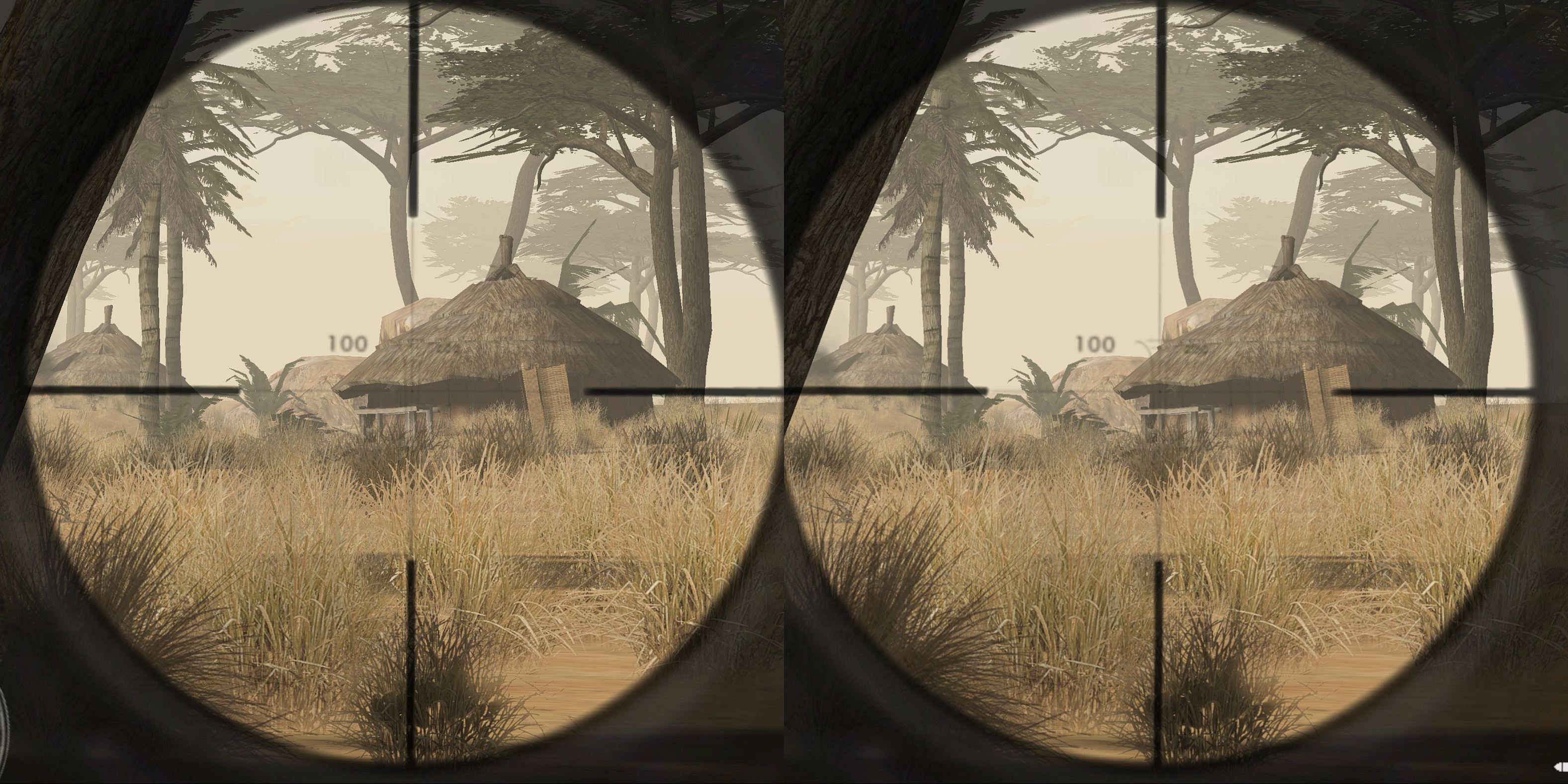
Code of Honor ( DGVoodoo2 ) – G3D
-DGVoodoo2 required
-Change Resolution(X,X) in VideoSettings.scr
-FOV is relatively low but ok for good gameplay
-very precise sniper mode
-use mono hotkey for aiming with non sniper guns
-If you encounter black screen crashes you may visit this site (Scroll up)
-profile availiable from the cloud
 Jun 8, 2018 at 8:03am #173375
Topic: Blocked from RJK's game engine checker?
in forum General vorpX DiscussionJordan117ParticipantI recently bought VorpX and have been experimenting with older, unsupported games, which requires looking into what engine they share with working titles. Unfortunately I’ve lately had trouble accessing RJK’s super-useful index of game engines — trying to load it or any other page on his site (like the VorpX wiki or even the homepage) generates a “403 Forbidden” error.
I thought the site was just down, but then noticed today that it was loading fine on my cellphone. Switch to my home WiFi, though, and it stops loading again.
Have I been IP blocked somehow from viewing the site? I have no idea why that would be. I’ve used it fairly frequently the last week or so but haven’t been scraping it or anything weird like that.
-
AuthorSearch Results
-
Search Results
-
Topic: Outcast – Second Contact
Outcast – Second Contact in G3D! Looks awesome. Try it out!
Right now, its free (DRM free and free free, lol, as in no money free) on Humble: click here!
I tested a few applications in the past but all of them were too difficult to handle, didnt work at all or headtracking wasnt availiable.
I wrote earlier in the forum about Stereo Photo Maker,a free program, but there were too many things to prepare to get it working. Now i have a preconfigured settings file that you can download and you can wiew stereo pictures right away.
please read more HERE
Beside others i also tested Sview , also a free program, interesting if you dont have VorpX yet and just want so sneak into how some users screenshots look like, but it has one big disadvantage, it doesnt provide headtracking which can be very annoing.
VorpX together with Stereo Photo Maker does.
I recently bought VorpX and have been experimenting with older, unsupported games, which requires looking into what engine they share with working titles. Unfortunately I’ve lately had trouble accessing RJK’s super-useful index of game engines — trying to load it or any other page on his site (like the VorpX wiki or even the homepage) generates a “403 Forbidden” error.
I thought the site was just down, but then noticed today that it was loading fine on my cellphone. Switch to my home WiFi, though, and it stops loading again.
Have I been IP blocked somehow from viewing the site? I have no idea why that would be. I’ve used it fairly frequently the last week or so but haven’t been scraping it or anything weird like that.