@Ralf No, that’s exactly what I mean.
I played SiN Episodes: Emergence recently, and I noticed that at the game’s default FOV (in Cinema mode), things looked about right at 5.0 but everything was a little too flat. If I increased the FOV, the depth started looking about right, but then everything was a little too tiny, like a doll, exactly as you’re describing.
I noticed the same effect in Assassin’s Creed Unity. I probably need to test more games since my memory is blurry on others. If there are any games you would suggest as a reference (preferably older ones, I don’t own many brand new games) that you think look perfect at less than 5.0 depth in cinema mode, I’d be very interested to know.
It could be I’m completely wrong on all this, but in my experience, it was the FOV increasing the dollhouse look, not the depth.
EDIT: I found a screenshot demonstrating the “dollhouse shrinkage” effect you get from increasing the FOV:
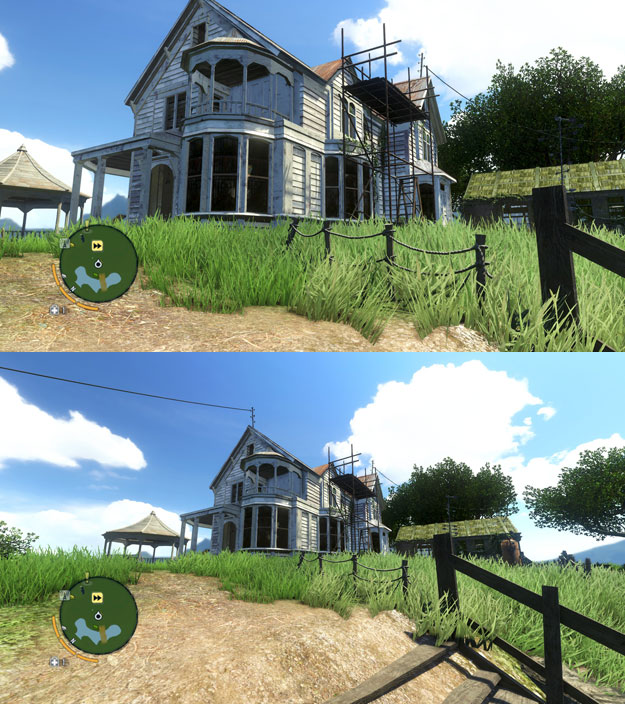
My understanding was the depth values were a separate value that didn’t cause that effect, just the relative distance the objects were from the camera.
@Stryker_66
I’m kind of surprised the Z buffer mode is offered at all. In everything I’ve tested it on, the effect was so weak it just wasn’t even worth running in my opinion. Have there been any games Z buffer mode does a great job with depth on?
If you are new to vorpX, you probably want to hop right into the action instead of learning how to configure vorpX. The list below contains first person games that work with litlle to no configuration in ‘Full VR’ due to vorpX’s DirectVR functionality, which can configure important things like field of view, head tracking or resolution automatically.
For third person games that are usually played best in immersive screen or cinema mode not much configuration is required in general, so this list focuses on first person ‘Full VR’ games that can be a little harder to configure without DirectVR.
If you are stuck, make sure to check the ‘Essential Hints Guide’ and the ‘Quick Reference’ in the help. They help you understand a few basic concepts.
Metro 2033
Metro Last Light
Kingdom Come Deliverance
Half-Life 2
Portal
Portal 2
Cyberpunk 2077
Left 4 Dead 2
Black Mesa Source
The Stanley Parable
Prey [2017]
Mirror’s Edge
Deus Ex: Human Revolution
Thief [2014]
Get Even
Dishonored
Aliens: Colonial Marines
Oblivion
Fallout 3
Fallout New Vegas
Fallout 4
Fallout 76
Skyrim
Outlast
Outlast 2
Crysis
Crysis 3
The Hunter: Call of the Wild
|
Titanfall
Titanfall 2
Conan Exiles [no BattleEye]
ArmA III (no BattleEye)
Far Cry
Far Cry 2
Far Cry 3
Far Cry 4
Far Cry Primal
F.E.A.R
F.E.A.R 2
Shadow Warrior [2013][DX9]
Shadow Warrior 2
The Talos Principle
Unreal Tournament 3
Bulletstorm Full Clip Edition
Conarium
The Turing Test
Hard Reset [original version]
Farming Simulator 2017
Gone Home
Dear Esther (original Source engine version)
Quake 3
Quake 4
Tron 2.0
Deadfall Adventures
Star Wars: Jedi Knight II
Star Trek Voyager Elite Force
|
@dellrifter22, Thanks for the suggestion, but it didn’t work. I tried changing pretty much all those settings, to no avail. Looks like I’m just not meant to play this game. Its quite weird that those games work fine for you however, and not me. I wonder what it could be? We are using the same profile, so how could it not work?
I’ll give farcry a try again soon and let you know. But I played with it for about 2 hours a few months ago and nothing.
@Ralf, None of those settings helped the judder, and they were already set that way. I’ll continue to fiddle with it I guess when I get time. DE:MD might just not be in the cards for me I guess.
I’ll report back if I find anything new. Glad it still works for you Dellrifter, gives me hope.
Make sure you are using Exclusive Fullscreen.
Just tested my Mankind Divided, working great still. Without Exclusive Fullscreen I get no z-buffer. I turn it back to exclusive, and bingo, 3D’s back.
This happens with hitman and a few other games too. If that doesn’t do it, try changing the AA settings and resolution.
FC5 base game still working fine also. Never tried the dlc though.
edit: I tried switching between fullscreen and borderless in FC5, and it did go flat at one point. But changing resolution seemed to fix it. Just try fiddling with it some. And make sure you have Farcry5.exe assigned to the profile, that it’s not just hooking with the default 2D one.
So since the last update, Mankind Divided no longer shows in 3D at all. I re-imported the profile, etc, but still nothing.
If this is a simple profile fix, any chance you could upload a new one for this?
And a couple of observations:
1) I’ve been noticing (sometime over the last 2 updates) that in cinema mode, there is a lot more screen judder when you move your head. I even upgraded to a 1080ti recently, and the judder is worse than ever. If I keep my head still, games are still very playable, but its weird because it was never there before. I think something in the last few updates caused this. Its not terrible, just noticable, and only on head movement. The framerates of the games seem great.
2) Far cry 5 used to have 3d as well, and now does not. I know its not officially supported, but I thought I’d mention it in case it helps with your troubleshooting.
all the Borderlands games work amazingly, very good 3D and the art style suits these pixel arrays.
I always thought the Borderlands games had an RPG element to them like Skyrim or Far Cry. I’ll check it out. Thanks.
@ all (most): Thanks for the kind words.
@ moarveer: Bioshock Remastered is a rather odd case technically unfortunately due to the way they did the DX9>DX11 conversion. As soon as I have an idea to tackle this in a decent manner, the game will be added, but I can’t promise anything. Currently it’s too glitchy.
@ nieda: FYI: About 90% of official profiles have G3D now. For AC:Odyssey you would need a GTX4080Ti (sic!) for G3D, not even AC:Unity G3D runs exactly great on current hardware. Far Cry 5: anticheat prevents vorpX from hooking as discussed multiple times here.
@ dborosev: AC:Odyssey Z3D base parameters have been adjusted to look more realistic. In Origins elements nearby looked extremely large and then got too small too quickly in the distance. This is more balanced now. You can however play around with the near/far option like dellrifter suggested if you prefer something else.
@ dellrifter22: no changes to the way Image Zoom is used. Only remotely related change is that in immersive screen mode a higher FOV is set if vorpX can adjust it. But that only affects immersive screen mode and there it has the opposite effect of what you describe. I’ll double check to be extra sure.
@ OculusRiftRocks: native 3D means that the game has its own SBS stereo mode. What the vorpX profile does is automatically setting the game options to utilize it. You could do the same with Crysis 2/3, but those had indeed a depth buffer based approach. Crysis 3 with vorpX G3D is superior.
See here. Basically, Ralf can’t do anything unless Ubisoft whitelists vorpX in its anticheat thing, which we all know is never going to happen.
for far cry 5 ( there is a topic in the general discussions), a user sent an email to the site of the “anticheat” program, and they said they whitelisted the vorpx for far cry 5!
Sniper Ghost Warrior 3 (G3D)

CryEngine game providing decent G3D play, with only minor shadow and nightsky glitches. Look for it on sale – grabbed it for $12 last week on steam. Kinda fun, like a Farcry/GhostRecon hybrid.
Profile now available on the cloud.
– use 4:3 resolution (1600×1200)
– slide FOV to max in game settings
– set shadows to “Low”
– set to hardest difficulty if you wish to customize HUD elements
Oh yeah! Just tried G3D Main Eye right on Insurgency, Farcry 2, Arma 3, Red Orchestra 2, and Fallout 4, and they all worked beautifully.
Aiming feels more natural now, just as I had hoped. Thanks again for this. Very useful!
I created custom resolutions in nvidia control panel. 2560 x 1920, 2732 x 2048 with ratio 4:3. I started the game but I can not set these resolutions in settings. The highest resolution in the game is 1920 x 1440. Is it possible to somehow force the game to use higher resolution than my monitor supports?
Provided you didn’t disable automatic settings in the vorpX config app, Far Cry 3 has fully automated Direct VR field of view since quite a while which is adjusted perfectly to fit your headset. The same is true for Far Cry 1, 2, 4 and Primal, also Battlefield 3, 4 and 1.
For games that do not have that please check the “Essential Game Hints” guide in the vorpX help. It explains which options you have to either solve or circumvent FOV related issues in cases that vorpX cannot handle automatically.
LEGO City Undercover is an openworld game (and relatively newer), TT Games probably choosed a different game engine for it. – Was worth a try.. May be you could try an openworld game profile like Farcry 1/2/3 or may be RISEN 1/2/3, Gothic 3, Oblivion.
Note: Some of the cloud profiles are not 3D even the “Geometry” setting is shown in the ingame settings. Thats why i mark my Geometry profiles always with (G3D) in order to avoid confusion.
was a while that did not happen to me, but now again many games (for example,far cry 3 or half life 2) after a few minutes, or after an hour, show me the black screen in oculus, while the audio continues to run. If I leave the game, the oculus reboots (the waiting hourglass appears) and the oculus home reappears.
What can it be?
I was considering recently getting FC 5 if VOrpx worked for it which is why I logged in today. What profile do you use and what settings did you adjust to get gamepad fully working?
Sorry for the late reply–haven’t been to the forum in a few days. I used the profile dellrifter22 created. You can download it from the vorpx cloud. All the information is in this thread here:
farcry 5 (uplay) injection failed
I’m not at my desktop so I can’t check which vorpx settings I used to fully enable gamepad but I will find out and post those tomorrow.
The profile looks good and runs really well … but unfortunately it isn’t “real” 3D. You CAN play the game in real 3D if you have Tridef 3D … there is a custom Tridef profile that provides full 3D in the game. It looks a little blurry compared to Vorpx though.

