Archives

Homepage Forums Search Search Results for 'The Witcher'

Viewing 15 results - 436 through 450 (of 529 total)
  • Author
    Search Results
  • #111367

    In reply to: Witcher 3

    pjag
    Participant

    I have the exact same issue, I sent them an email last week but no response yet…it is odd as I have had Blood and Wine installed from day 1 and it used to work just fine, but not I just get the sound playing with the ‘Sorry, Witcher3.exe taking a long time” etc etc…I have tried everything!

    #111066
    billyisms
    Participant

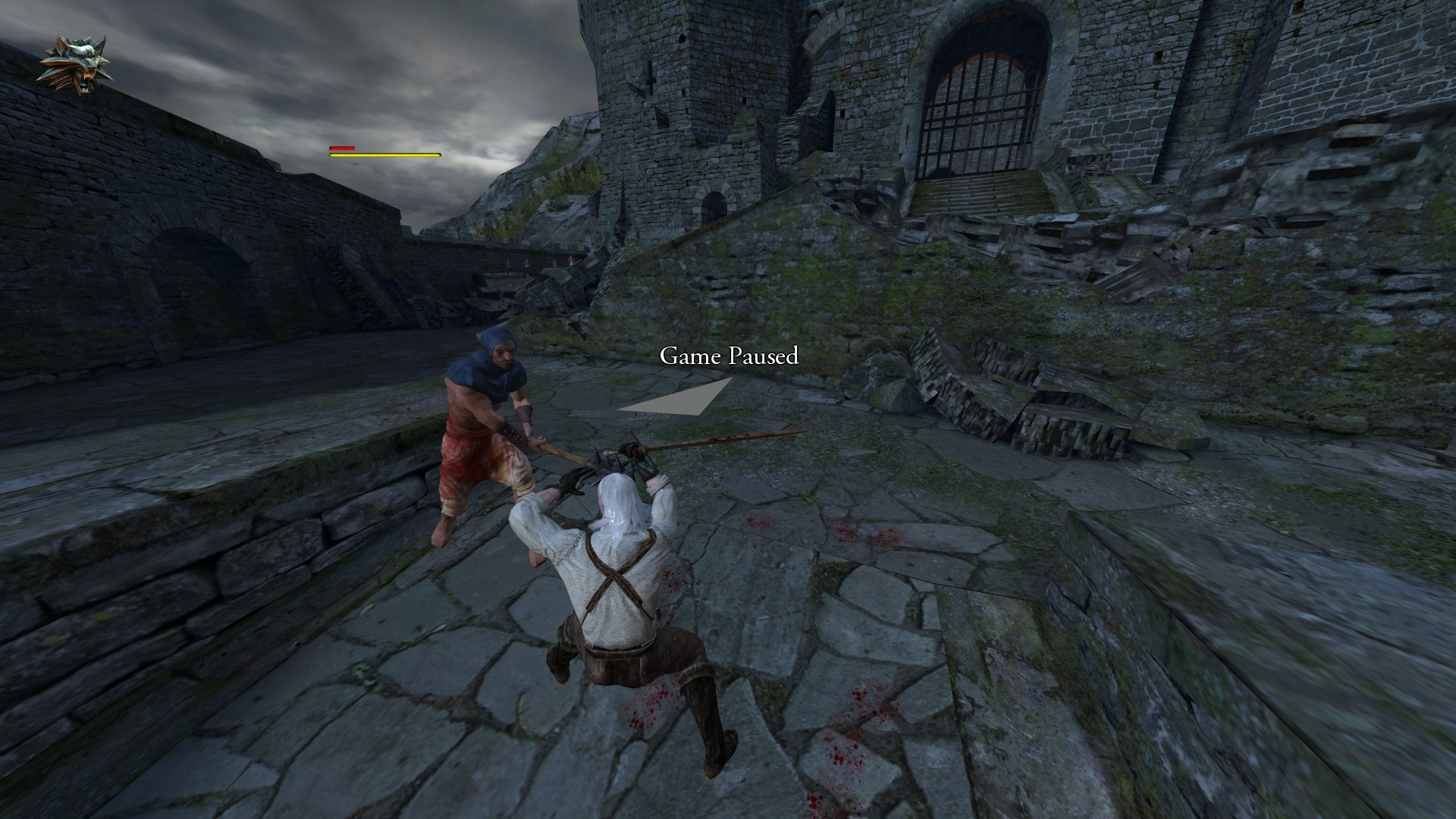
    I am attempting to play Witcher 1 Enhanced Edition, and have an artifact which makes the game almost unplayable. There is a flickering trapezoid almost directly in the middle of the screen. I took a screenshot of what it looks like in the game:
    Trapezoid Shape

    This almost represents the exact shape of the artifact:
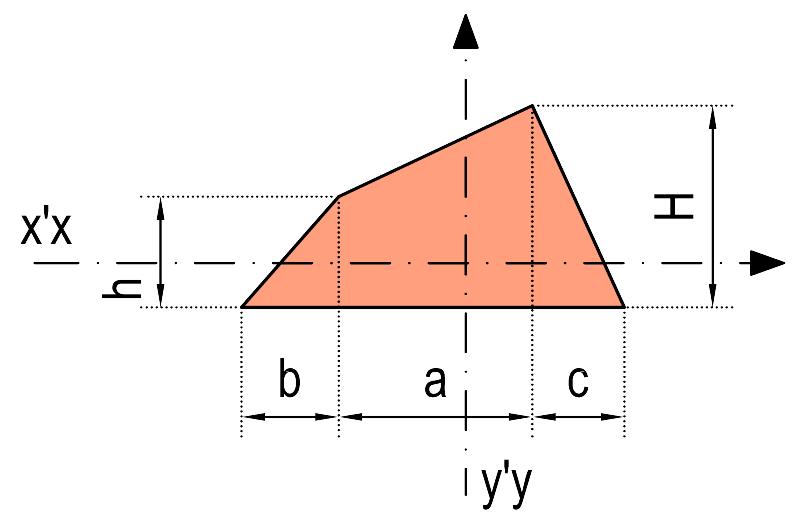
    Shape of Artifact

    Is there any way of removing this artifact? This occurs in the vanilla Steam version as well as GOG version whether I am in Cinema mode or not. It does not show up when played without Vorpx.

    Any advice is greatly appreciated.

    #110789
    TenaciousJ
    Participant

    These aren’t all FPS games, but are excellent picks:

    The Vanishing of Ethan Carter is AWESOME in VR if you’re into mystery adventures
    Elite Dangerous if you like space exploration games
    The Elder Scrolls Series – primarily Skyrim.
    Fallout 4
    The Batman Arkham Series
    Metro 2033
    Call of Duty Black Ops 1-3, Battlefield 3-4 and even Hardline, Any Splinter Cell or Crysis game
    Alien Isolation
    Quake I-III
    Half Life 2
    Portal
    The Witcher 1 and 2 if you like extended campaign games that will suck all your time, not sure if Witcher III is manageable at acceptable graphics levels
    Bioshock: Infinite
    Borderlands
    GTA IV and V
    and to tickle your fear of heights check out Mirror’s Edge

    Essentially if your computer can run it, and it’s built on a major game engine like Unreal, Unity, and quite a few others – it’ll play in VorpX. The less popular it is the more tweaking you’ll have to do though because it won’t have been done already by someone else. Once you get used to the Vorpx in game menu you’ll be able to get games to run. Whether you get a true stereoscopic experience depends on how the game was coded though.

    I’m sure that’s clear as mud now.. lol. But hopefully there are a couple of games on there you can check out that are well established as compatible.

    VorpX Supported Games

    cemo
    Participant

    Hi Guys

    Yesterday i bought Vorpx to Play Witcher 3 or Battlefield etc.

    I have install the programm and than Start the Config.
    First i disabel the Headtracking and than i checked if one if the Games are Supported.

    I Apply and than Apply and closed the Program. I Restart Vorpx and than i Start the Game. My rift goes on but i get a Black Screen in the rift and in my screen. I have a Sound but i cant See anything.

    I Tried it with Battlefield 4 and Witcher. Same Problem.

    I Hope you Guys can help me

    #110210

    In reply to: Witcher 3 support?

    egone140
    Participant

    I’ve the steam copy of the game but I created the shortcut as advised and its still not working. The best I’ve been able to get working is a blank monitor with the sound coming through the rift. The rift screen just displays the text “Sorry, witcher3.exe is taking a while to load. If this issue persists, please take off your headset and check the app on your computer.” The text appears in the white grid room of the rift software.

    #110188

    In reply to: Witcher 3 support?

    Ralf
    Keymaster

    Sill works here with the DLC. If you have the GOG version, you can try to create a vorpX desktop shortcut. To do that, simply choose “Create Desktop Shortcut” from the tray icon right click menu and then browse to witcher3.exe. These shortcuts generally hook more reliable, but unfortunately do not work with many Steam games. Still worth a try with Steam too.

    #110186

    In reply to: Witcher 3 support?

    egone140
    Participant

    I’m having the same issue with The Witcher 3 not loading, I’ve read that the Blood and Wine DLC may have changed something and that a new version of vorpx is required.

    #106316

    In reply to: Witcher 3 support?

    rtoast
    Participant

    Could you describe how you got it to load? I’m stuck in the same boat with the sound coming through but stuck at the “witcher 3 is taking a while to load” screen.

    #105349
    Fredthehound
    Participant

    OK folks, Part 2.

    Before we get started, let me explain a couple things that are important to understand when modding skyrim, regardless of what CPU or graphics card you have. the Creation engine, running DX9, was old when Skyrim released and was a kludge of sorts based on the old Gamebryo. Without getting into detail, lets just generalize and say it has issues. Memory management being among them. And many of the problems encountered modding Skyrim, and that includes VR modding, stem from those.

    Fortunately there are fixes/workarounds out there for many of them. Skyrim could not be modded without them to the degree it is. They all address one or more issues and some are the literal basis of many a mod besides. These are must installs even if you do not mod Skyrim because they deal with problems that need dealing with, mods or not. I’ll provide the links and you can read up on them from there because there is no point in me rewriting War and Peace…which is what a thorough explaination here would result in …and this ain’t that kinda’ article ;)

    Skyrim Script Extender / SKSE / SKSE-Shishon’s Memory Patch
    http://skse.silverlock.org/

    Bug Fixes
    http://www.nexusmods.com/skyrim/mods/76747/?

    Crash Fixes
    http://www.nexusmods.com/skyrim/mods/72725/?

    USLEEP – Unofficial Skyrim Legendary Patch
    http://www.nexusmods.com/skyrim/mods/71214/?

    They are the American Express of Modding. Don’t leave home without’em. (Yes, I’m that old ;)

    There is one more ‘essential’ that unfortunately we cannot use in VR. ENBoost. This is a memory manager and more that unfortunately VorpX cannot use…at least in theory. There is a version…the ‘Injector’ version, that supposedly work but success stories are unicorns. So for now, I’ll leave discussion on that out. Hopefully at some point, someone will sort it out because it is a great program and solves many, many issues.
    ———————————–

    OK. So with the memory patches and assorted fixes in place, we move to the meat of the issue. Skyrim 2K texture pack / Lite version.

    From the Nexus page:

    “Explanation FULL/LITE:
    FULL – All the textures are at the maximum resolution. Average is around 4x the official HD DLC.
    LITE – All the textures are at 50% of the FULL Version. Average is around 2x the official HD DLC.”
    http://www.nexusmods.com/skyrim/mods/607/? ”

    While twice the rez of the official texture pack, the lite version of this one is actually less heavy on resources than the official version, looks better and is pretty damn nice to look at. But surely something that much more detailed than the stock textures HAS to be a framerate killer right? RIGHT????

    Well lest we forget, we installed better memory management above. And because of those few changes and fixes, Skyrim is now a very different animal than it used to be. Normal rules have been altered a bit. Remember that in bone stock trim, I was seeing solid 43-45FPS on the WRF/FRW runs. The only dips below that were on cell loads and changes which CANNOT be totally eliminated.
    ———

    Whiterun/Riverwood/Falkreath (WRF run) and back:

    No change in minimum framerates. In fact, thanks to those managers and fixes, the framerate counter was most often 44-45.5. It got FASTER. Not slower. Faster. Ever so slightly, but it’s there. Now consider this is still at 8xAA, 16x AO and 2.0 upscaling. This included day/evening, night and sun/rain.

    And it ‘felt’ more responsive. It was smooth before. As I said. This is now a different animal altogether. The CPU and GPU are still just casually cruising along with no effort on their part.

    ——————————–

    OK now how does it look? Well, as you’d expect, it looks considerably better. It’s not yet at Witcher 3 levels because no lighting or weather mods are in yet, but there is no mistaking a significant visual boost. And at ZERO FPS cost and quite literally, for 20 min of modding, including downloading the files.

    Next up will be the killer. Skyrim Flora Overhaul. I will be using the ‘regular version rather than the newest because the regular is hard enough on the system. In VR, the full/new version is too intensive to deal with, even for a Titan. However, the regular version is a sight to behold and transforms the game into something far more ‘realistic’ looking.

    OK, thats it for now. Time for bed ;)

    #105240

    In reply to: Witcher 3 support?

    passprogress
    Participant

    I get the message witcher 3 is taking while to load… i hear the sound but nothing else. I have the patch 1.22 on witcher 3 and both vorpx and oculus runtime are up to date.

    I5 4670K
    Evga GTX 980 TI reference
    16 gig ram 1600MHZ
    samsung evo 500Gig ssd
    XFX gold 750 watts PSU
    Windows 10 updates 1607

    #104794
    Vpxvoxer
    Participant

    What exactly is (technically in Vorpx) limiting the games’ fps ?

    I’m always getting 73-74 fps with rare Jumps to 75 … Ok, my machine sucks you’ll say but this is very unlikely because it doesn’t matter if I run Max or low Detail in e.g. Doom or Witcher 3. Even low resolutions dont help. It seems like “my” Vorpx fps Limit is 74 … not 75. This produces stutter of course. I don’t use vsync or other limiters of course. Doom runs ~200 maxed out … Even old Games with 500+++ fps are bound to 74 … not 75 …

    Thanks in advance…

    Thoraz
    Participant

    I had been playing Battlefield 4, GTA V, The Witcher 3, Rise of the Tomb Raider, and The Division for a long time at 1080p/60fps on a 65 inch plasma TV at a distance of 8.5 ft (optimal distance for that size/resolution according to online calculators & charts). I was able to easily see the difference between Low, Medium, High, Ultra on the TV just fine. But for some reason when I play those games using the Oculus Rift (CV1) and VorpX (or Virtual Desktop) I can’t tell the difference between the highest and lowest settings. In terms of visual fidelity I see absolutely no difference or the difference might for some reason be so small that I can’t detect it. Obviously there is a huge impact on frame rate going from lowest to highest, but I’m curious about the visual fidelity. I am running those games at 2160 by 1200, 90+ fps (depending on game somewhere between medium to ultra)’ 980 ti. Any idea why that might be? Have u experienced the same thing (same visual fidelity regardless of low or ultra settings)?

    #104461

    Topic: please help

    Bassline204
    Participant

    I bought vorpx and I thought it would work. I have the vive and have switched it to htc vive mode.

    However witcher 3 fails to start
    world of Warcraft is not true VR it’s just like a screen put infront of the lens and doesn’t at all feel like true VR. I’m thinking i’m setting it up wrong cos I hear really good stories about this product ( which is why I bought it)

    I run withcer 3 from steam. And it always says failed to start unknown reason.

    ESO online doesn’t even hook.

    world of Warcraft only hooks when I turn it to dx9 and then it looks crap.

    please point me in the right direction here so I can enjoy my product

    thanks

    prinyo
    Participant

    Hello,

    I’be got my Vive yesterday and I’ve spent so far about 8 hours discovering what and how it does. First I tried some of the VR apps on Steam and then concentrated on the main reason I got it in the first place – playing older AAA games. In the past months I’ve been playing on a big 3D TV on SBS 3D (TriDef) and I had some hopes and expectations on how the games will look and behave in VR.
    The result is somewhat confusing and I have faced several serious problems that I need to resolve if I’m not going to go back to the 3D TV setup. The VR experience, while problematic in many aspects, felt really promising and exciting.
    As a fresh Vive user I’m overwhelmed by the complexity of the system and the multiple options that need to be tweaked – on the hardware itself as well as different software applications. So I’m afraid I’m missing important steps/points/tweaks that can make the games actually playable. And maybe I’m missing an obvious solution for them.

    1. The first problem is of course the frame rate / motion sickness. I’ve seen different solutions for the FPS problems and I’m going to experiment with them. I tried Skyrim, FO4 and Witcher 2. It seems the motion sickness is not really related to the frame rate as such. For example out of the 3 games Witcher 2 gave me the less dizziness which was completely unexpected as this game has terrible FPS even on a normal 2D playthrough. In Skyrim (and FO4) I was unable to make more than 3 steps walking or running before feeling dizzy. However I had no problems whatsoever with the killmove cutscenes that people usually complain about. So I guess my question is – what exactly causes the dizziness and how can I minimize it?

    2. I’m using ENB Boost (as injector) with Skyrim, FONV and Oblivion which allows them to run without constantly crashing. I’ve read several speculations that ENB interferes with the performance of Vorpx and if you use it you are doomed to suffer low FPS no matter what. Is this true and are any considerations about running them together in terms on setting them up?

    3. Menus and other HUD elements – impossible to see. Yes, there is the mouse-wheel solution but while you see the HUD while it is pressed there is nothing you can do with it. What I did was – press the mouse wheel, look at the option that I need to select and then trying not to move my hand or head at all release the wheel and click. This is quite annoying and what is even worse it reflects the dialogue interface of Skyrim making even talking to NPCs a tedious experience. I can’t even imagine trading with a NPC. Is there a solution for this?

    4. Direction of movement – you walk and run wherever you are looking at. This will create a lot of problems for me as I’m used to constantly looking around while my character moves. I haven’t really tried it fully in Skyrim and FO4 because of the motion sickness issue. But it makes W2 completely unplayable because Geralt keeps running against the invisible walls in this half open-world game. Because the view is quite zoomed-in it is impossible to fully asses the terrain and predict where exactly the path lies. Is it possible to have the option to look around by moving your head while not influencing the direction of movement?

    Thanks!

    #103919

    In reply to: Nothing works

    Ralf
    Keymaster

    In that case please double check that you have the latest Oculus software installed. This error usually occurs with older runtimes.

    You need to make sure that no remnants of an older runtime is present on your system. Make sure to completely uninstall any beta runtime that you may have installed and DO NOT use a runtime switcher.

Viewing 15 results - 436 through 450 (of 529 total)

Spread the word. Share this post!