-
Search Results
-
Topic: Among the Sleep [legacy]
I love to explore neat environments in VR, and Observer looks like one I’ll need to check out. Thanks Stryker. Here are new profiles for a couple more I enjoy:
Among the Sleep [legacy] (G3D)
This game has an old VR mode, but vorpX gives more control to make it look the way I want. It’s fun to see through the eyes of a toddler and explore his nightmarish world of exaggerated proportion.
So far I can only get 3D with the legacy version, so users will need to roll back to legacy 1.3.2 in the Steam Properties – Betas tab.
– use a 4:3 resolution (1600×1200)
– in game set FOV to max 90
– in game turn off crosshiar dot*Has toggle for shadows and scalable HUD
Lethe – Episode One (G3D)
Another atmospheric adventure through a frighting underground. It plays similar to Amnesia and is pretty well made. I hope they can continue with more episodes.
To avoid conflicts with the official Unreal 3 profile, I renamed UDK.exe to Lethe.exe in steamapps\common\Lethe – Episode One\Binaries\Win32
– launch game from Lethe.exe (not through steam)
– use a 4:3 resolution (1600×1200)
– in game set FOV to max 100*Has positional tracking and scalable HUD
Topic: Observer
Observer (G3D)
I created this profile based on Conarium a Unreal 4 game. Works pretty good in G3D considering the unique graphic style. Disabled 1/2 dozen shaders ranging from lighting, shadows and blood splatter. Profile set to immersive mode.
Notes:
– Recommend a few ini tweaks such as FOV, Anisotropic filtering (AF), High Frame Rate, Chromatic Aberration and Depth of Field. Instructions here
In Game Graphic Settings
AA – TXAA or FXAA
Shadow Quality – High
Texture Quality – High
Resolution Scalability – Uber
Lens Flare – High
Motionblur – Off
SSAO – Off
SSR – High
SSS Quality – High
Separate Translucency – OffUse highest resolution you can without killing performance. Just watch for a small cursor on higher resolutions which is used for interacting with dialog trees and some objects. Re-configure key bindings with commands that do not conflict with Vorpx.
Profile uploaded to the cloud.
Stryker
Topic: King’s Quest 2015
King’s Quest 2015 (G3D)
Since there are recent posts regarding point and click adventure story driven games, I thought I share this profile based on the Life is Strange (Unreal 3) profile. Disabled one shader affecting light + shadows which has resulted in a very clean cartoonish G3D look. I only own chapter one so I cannot speak for the other chapters.
Notes:
– Use highest resolution you can, I have 3840×2160 16:19
– Profile set for Immersive mode which works really well because of edge peek
– Profile has strong 3D setting which you can change of courseI have found that on extremely close up camera scenes, just switch to edgepeek. Avoids the cross eye…lol…Other option is to lower 3D strength but I think some scenes with the different camera perspective are really cool and good looking to view in the headset with a strong G3D.
Profile uploaded to the cloud.
Cheers,
Stryker
Topic: Remember Me
Remember Me (G3D)
This game is really awesome in G3D and looks surprisingly good. Disabled shadow shader only and profile is based on the Unreal 3 engine profile. VorpX settings can be changed to your preference and is set for cinema mode with a 2+ G3D strength setting.
Notes
– ini edit for key bindings for multiple FOV values (see link below)
– my resolution is set custom 2400×1350 16:9 (higher caused mem crashes)
– all graphic settings maxed out
– vsync offKey bindings for FOV values can be found here
I used 3 keybindings for instant changes to the FOV for various game perspectives. My ini edit is the following but you can change to your preferences.
Bindings=(name=”F9″,Command=”FOV 75″,Control=False,Shift=False,Alt=False)
Bindings=(name=”F10″,Command=”FOV 90″,Control=False,Shift=False,Alt=False)
Bindings=(name=”F11″,Command=”FOV 110″,Control=False,Shift=False,Alt=False)Game world is really interesting with lots of detail. Profile uploaded to the cloud.
Cheers,
Stryker
Topic: A Story About My Uncle
A Story About My Uncle (G3D)
Got this game free today through Humble Bundle. Surprisingly good in Full VR mode. The profile I uploaded to the cloud is based on the Unreal 3 game engine. I used the shader authoring tool to deal with 3 issues. Shadows, window rays and this foggy blurry game overlay have all been disabled which results in a pretty good looking in first person.
Notes:
– In game field of view to maximum (120)
– Disable motion blur
– Set to highest 4:3 resolution you can, I am using 3840×2880Profile is set to high tracking since I lowered the mouse sensitivty to 8.0 and disabled smoothing in game options. I notice this reduces camera stuttering.
If you haven’t already, try and grab this game through humble bundle for free
Stryker
Topic: Styx: Master of Shadows
Very nice Stryker, i had that one on my list too.
Cheers RJK_! Quite a list of games you’ve maintained, thanks for curating.
Another Unreal 3 Engine game to add to the list.
Styx: Master of Shadows (G3D)
Disabled a few annoying shader’s that did not render correctly in G3D. Interesting stealth/action/platforming game. Really no need for any FOV adjustments on this one. There is a way to bind multiple FOV settings to keystrokes which can be useful for “on the fly” switching. See this post on how to do this. I am using the 32bit exe on this one. Profile uploaded to the cloud.
Best,
Stryker
If you are new to vorpX, you probably want to hop right into the action instead of learning how to configure vorpX. The list below contains first person games that work with litlle to no configuration in ‘Full VR’ due to vorpX’s DirectVR functionality, which can configure important things like field of view, head tracking or resolution automatically.
For third person games that are usually played best in immersive screen or cinema mode not much configuration is required in general, so this list focuses on first person ‘Full VR’ games that can be a little harder to configure without DirectVR.
If you are stuck, make sure to check the ‘Essential Hints Guide’ and the ‘Quick Reference’ in the help. They help you understand a few basic concepts.
Metro 2033
Metro Last Light
Kingdom Come Deliverance
Half-Life 2
Portal
Portal 2
Cyberpunk 2077
Left 4 Dead 2
Black Mesa Source
The Stanley Parable
Prey [2017]
Mirror’s Edge
Deus Ex: Human Revolution
Thief [2014]
Get Even
Dishonored
Aliens: Colonial Marines
Oblivion
Fallout 3
Fallout New Vegas
Fallout 4
Fallout 76
Skyrim
Outlast
Outlast 2
Crysis
Crysis 3
The Hunter: Call of the WildTitanfall
Titanfall 2
Conan Exiles [no BattleEye]
ArmA III (no BattleEye)
Far Cry
Far Cry 2
Far Cry 3
Far Cry 4
Far Cry Primal
F.E.A.R
F.E.A.R 2
Shadow Warrior [2013][DX9]
Shadow Warrior 2
The Talos Principle
Unreal Tournament 3
Bulletstorm Full Clip Edition
Conarium
The Turing Test
Hard Reset [original version]
Farming Simulator 2017
Gone Home
Dear Esther (original Source engine version)
Quake 3
Quake 4
Tron 2.0
Deadfall Adventures
Star Wars: Jedi Knight II
Star Trek Voyager Elite ForceTopic: Medal of Honor 2010
============================================================
Gave 2010 a go and got some decent results with the FOV tool from PC Gaming wiki. Another good one with pretty clean Unreal Engine G3D.
Medal of Honor 2010 (G3D)

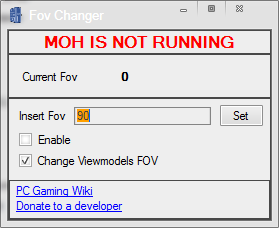
The FOV Changer makes full world and viewmodel FOV possible, however it only applies to the currently selected weapon. Since it grows tiresome to reset for each new gun, I’ve opted to combine with forced G3D enhancement for viewmodels. This introduces pop-in culling around peripheral view, but keeps both FOVs correct all the time. I think it’s worth it, and not so bothersome as to kill the overall experience.
– Download the FOV Changer here. Looks like this:
– run FOVChanger.exe, uncheck Viewmodels, check Enable, enter 97
– wait to click Set button until you’ve launched the games splash screen, or anytime once you’ve started the game. Now you are good to go.
– use a 16:9 resolution to hide more culling (1920×1080)*G3D Shadow treatment toggles crosshair, set Auto for acog scopes fix
*Singleplayer version only
*If you get “General Protection Errors” first time, reinstall PhysX drivers from:
Origin Games\Medal of Honor\__Installer\DISK1\PhysXI think I’ve disabled all undesired shadows and textures halfway through, but will update the profile if more are discovered. Made it past the ATV night mission, pretty neat so far. Enjoy.