
-
AuthorSearch Results
-
Apr 22, 2023 at 6:43pm #216006
Topic: shadows of doubt (voxel)
in forum General vorpX Discussion matteo39Participant
early access out 24 april…
fantastic game, but is in voxel: does vorpx work on voxel?
Mar 24, 2023 at 10:36am #215632In reply to: Are custom resolutions still working?
RalfKeymasterKeep in mind that 2448×2448 compared to 1920×1080 means 3x the number of pixels. (~6 megapixels to ~2 megapixels), which not only raises the GPU workload, but also the required GPU memory significantly. Try to find a balance that works for your system.
On a sidenote: exactly square resolutions are a bad idea, IIRC vorpX displays a warning in such a case. Messes with some 3D heuristics (e.g. shadow detection), which may also affect performance. Never dial in an exact square resolution, always use something that is at least 5% wider or narrower. To keep things simple use a 4:3 res, which also avoids issues with games that only want common aspect rations.
If you happen to use the beta, use the virtual monitor. It’s main purpose is to make sure you never have to dick around with custom resolutions yourself anymore.
Mar 21, 2023 at 4:59pm #215606In reply to: Vorpx Patreon/Donations Support
mr_spongeworthyParticipantA complex subject for sure. I could see several routes, and am personally happy to pay a bit more for vorpX over time. Nobody here wants to see vorpX go the way of other 3D products. As a general rule I dislike subscription software, and even though it does make those companies plenty of $, it also drives away a lot of potential future users, as well as a lot of long-time users. Take Adobe as an example; no longer a part of any workplace I’m associated with, but was at one point absolutely dominant. Users have moved to products like Pixelmator Pro, which may not offer 100% of the functionality, but offer a very compelling feature set in a product that can be purchased for a reasonable price and then maybe have a small upgrade cost on a major revision only.
I’ll try to keep my thoughts brief (hahahahaha, right…)
1) Charge a small amount per-game for the profiles users actually use. It could be built into the vorpX client (a real PITA I bet). So a customer has bought the base product for a reasonable price, and if they don’t really use it for many games they aren’t out a lot more $. You could include an ‘out of the box’ base number (100?) of supported games, and then charge for the additional profiles. The user would click the game title, see “Basic Z3D Profile for Starfield: $1.99”, or “Advanced G3D & AFR support for Starfield: $5.99” or something like that. Enter the card data (have it stored) and *bang* they’ve got the profile. You could even figure out a way to monetize profiles created by users, IF they wish to take part. If RJK builds 10 perfect G3D profiles, maybe 50% goes to Ralf and 50% to the profile creator when a users buys a customer-created profile? You get the concept. (I expect implementation of this might really suck though.) This would also be a way for Ralf to feel like he isn’t wasting his time refining profiles, since those profiles would immediately produce at least a small return. (I would be happy to pay for perfected G3D profiles for games that already have Z3D only, or a less-than-perfect G3D experience.)
2) Charge for major product upgrade cycles. So much simpler than my first suggestion, but with some downsides. For example, no matter how good your product is, some people will have problems with the new revision, and/or simply like the prior version better for whatever reason. These people will be VERY vocal about their dislike to the new version they “paid for.”
3) Charge a very small subscription fee for a certain tier of the product only. For example, maybe all Z3D profiles are included, but all more advanced profiles (G3D) are subscription based. IMHO this would have to be a fairly low price-point as people are getting overwhelmed with subscription services of all kinds.
@RJK: I’ll try some more of your profiles if you get time. I admit that I notice rendering issues that many people overlook or just don’t seem to care about. I would be *overjoyed* to find properly working G3D profiles of some titles (no shadow issues, no disabled shadows, no lighting issues, etc.) If I use some profiles that work really well I’m absolutely happy to donate. If I haven’t donated already it’s probably because I haven’t found a G3D profile that works as I wish for any title for which I needed one.
@Ralf: You are basically the last 3D solution out there for old 3D systems as well. I know you’re full-speed-ahead into the VR experience, but there is an untapped / abandoned market out there. Add a few more G3D profiles and more 3D modes for old displays and projectors, and hopefully the word will get out in those communities that used to rely on other products.
Feb 24, 2023 at 4:00pm #215292In reply to: Cyberpunk VR Update Thread
mr_spongeworthyParticipant@Tophness I found that Steam itself was crashing during Cyberpunk (only, all other titles were fine.) Try the Steam beta version, which resolved that issue completely for me. Also try this SYNC method: Slow + Multithreaded. Works very well for me on my 8K-X.
(Note and digression; I’m getting considerably better performance using the vorpX beta than I do using the stand-alone mod. But I’m only shooting for cinema mode, not full VR. Not a problem with vorpX, but rather a problem with the Cyberpunk engine being incredibly soft-focus. A title like FO3 looks incredibly crisp and detailed at full VR even clear down to around 2880×1600 pixels, and looks glorious at 4K. Cyberpunk looks eye-wateringly crappy at anything below 4K with DLSS OFF once blown up to full VR size. It’s probably that shit TAA. You can force that off but then it’s got all kinds of other issues because the devs appear to have used TAA to hide other issues. That’s happening with other Devs also at this point (Hubris comes to mind immediately). Running at 4K no DLSS to my HMD is 30fps for me, even on a 4090. I’ll need at least 60fps, or maybe 45 with Brainwarp – if Pimax ever fixes that (nope, not gonna happen), so maybe I’ll get to try Cyberpunk in full VR if Ralf gets DLSS3 Frame Gen working, or when the 6000 series cards become available (2030?)
Jan 13, 2023 at 12:16pm #214670In reply to: Anyone tired of tediously adding custom resolutions?
RalfKeymasterHad to try that right away. Technically worked, BUT: full 8K seem to be too much for 32bit games, which can only address 2GB of GPU memory. vorpX creates two extra copies of the backbuffer to send it to the headset efficiently, and with G3D also many of the game’s rendertarget textures have to be held in memory twice. Switching to Z3D and then back to G3D freed some resources and improved the situation, but still:
Each 8K full size backbuffer/rendertarget alone has roughly 125MB.
7680 * 4320 * 4 (BytesPerPixel) / 1024 / 1024.Not hard to imagine how even older games in 8K can eat up 2GB of GPU memory fast, especially with G3D, where rendertargets and backbuffers get duplicated.
No such issues with newer 64bit games, of course. There GPU performance and the actual amount of GPU memory are the only limits.
Jan 8, 2023 at 2:42pm #214568v301ParticipantI found a way to increase FPS by 200%, GTX, RTX, LCD, OLED – HMD.
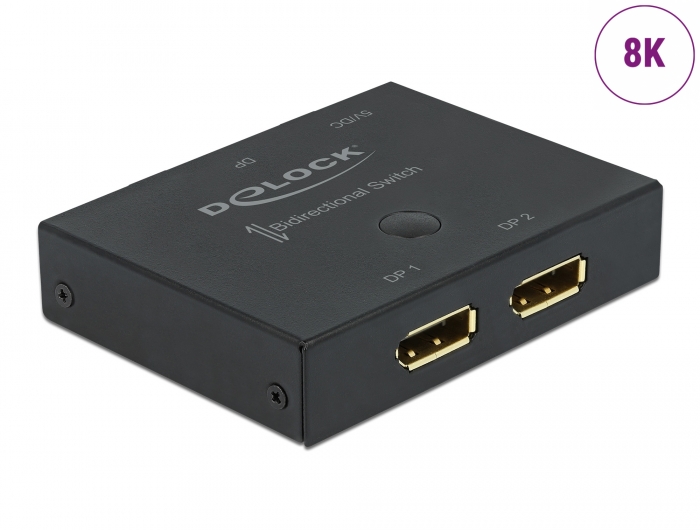
just set CRU 1.5.2 to two squares of the native HMD resolution, and connect the monitor via the 8K Display port switch, this will allow you to freely add a resolution above 4095px for the game engine and within the pixel frequency (up to 600Mhz for me) 30-90HZ screen refresh.A video image that does not require scaling frees up the resources of the graphics card, of course, the higher the stretcher, the wider the field of view of the eyes.
The tip of the nose covers 16:9 and 4:3 is clearly visible, above the nose at eye level, the native HMD resolution of 1:1 two squares is clearly visible.Jan 6, 2023 at 5:54pm #214550In reply to: How to add 4K-12K custom resolutions for PC games?
v301ParticipantTips:!!
For LCD and OLED monitors that are wider than 4095px
a physical 8K DisplayPort 1.3 or 2.0 switch must be purchased
and edit “extensions blocks” in CRU1.5.2 system edid editor.
There we add a 5760×2880 (any Hz) slot for Pimax Crystal and a second 4320x2160px (any Hz) slot for 4K Headsets.This allows you to maintain 200% GPU FPS without the need for scaling.
In the settings, check “create 3 virtual monitors when starting VR” after creating the virtual monitors, change up to added native resolutions of the VR headset You have so that the game engine renders 1:1 pixels. When we turn off VR “3 virtual monitors are closing” and the system automatically returns to the native resolution of our physical monitor.
For monitors up to 4095px wide, we add custom resolutions to the Nvidia, Ati-Radeon or Intel in custom resolution drivers editor. It works.
example:
 Dec 20, 2022 at 1:22pm #214232BonoscotParticipant
Hey guys and gals.
Im new to all this and slowly reading my way through the forum and trying to tinker with things.
Anyways i have a few issues with a couple of games that ive tried.
I played Titanfall 2 last night in VR and actually thought it was fantastic the graphics looked good but not great…Im using Steam VR is there a way to make the graphics better in this game? I messed about with satuartion/Brightness etc and it made it stand out more in color but is there a way to make the pixels look more crisp?Is there a way to be able to see the menu in front of me? I feel as if i need take my headset off to read the menu and objectives because its far to close in VR.
When playing Star Wars Lego,i tried the vorpx setting and the game ran in full VR,the issue i had though is that i was right behind the chracter on screen and my head tracking was all over the place….I tried to fix the head tracking via the menu but it wouldnt work. I feel as if im far to close to the character and i actually feel sick (and i never get VR sickness from any game).
Outlast…Outlast looked good but not great in terms of character and item size. I feel as is im either to tall and the chairs and tables are to small or vice versa…im to small in VR…Game looks good though but the size and scale seems off.
TBH i actually really enjoyed playing in immersive mode…I played MK11 in that mode and the 3d effects were really good…I actually really enjoyed this. Sitting on a chair in VR but playing a game within a game really got me hooked…WHat other fighting games or 2d Platformers work well in this mode?
Thanks for any help..and i ll continue to read the forums for more knowledge….Glad i purchased this now.
Dec 12, 2022 at 4:40pm #214138In reply to: How to combine the SBS images?
AnnihlatorParticipantBenQ’s product-page (on their own site) doesn’t list it in the specs, but does mention it in the FAQ:
The current firmware version only supports 3D Frame Sequential (PC) and Frame Packing (Blu-ray), the side by side 3D and Top & Bottom 3D are not supported yet.The display unit/monitor has to support side-by-side, which is the generally the oldest supported type, but nowadays the most common-supported type is the 3D Frame Sequential type, which basically each sent frame switches between the R and L eye/projector.
The framepacking method would be closest, as that generally is Left and Right (respectively) stacked on top of one another, with a few added pixels of blackspace. other then that it is simply two fullsize images on top of one another.
I’m not sure if VorpX already has a top-bottom 3d output, maybe that could be adjusted/adopted in order to get (even if somewhat finnicky) framepacking support :)
Dec 1, 2022 at 7:36am #213986In reply to: What is the future of vorpx?
TonyDParticipantThe future of VorpX is the past. The best games have already been made. I’m hoping Ralf can get Direct X 1 working with VorpX. The new games are just SJW wank anyway.
It would be wicked if he could make something like 3DSenVR for older pixelated games like UFO: Enemy Unknown (1994). I would buy another VorpX app just for those games or something like a 3-D emulator fork for XBOX/Wii/PS2 etc the way that the Dolphin VR and PSP VR forks work.
That would be cool, and I would pay for that too!
Nov 28, 2022 at 12:05pm #213951In reply to: What is the future of vorpx?
TheLastStarfighterParticipantThe future of VorpX is the past. The best games have already been made. I’m hoping Ralf can get Direct X 1 working with VorpX. The new games are just SJW wank anyway.
It would be wicked if he could make something like 3DSenVR for older pixelated games like UFO: Enemy Unknown (1994). I would buy another VorpX app just for those games or something like a 3-D emulator fork for XBOX/Wii/PS2 etc the way that the Dolphin VR and PSP VR forks work.
Nov 14, 2022 at 9:14am #213758In reply to: Cyberpunk VR Update Thread
matteo39Participanti play in z-normal, and when amd dlss 2.1 is active, there is a strange effect on screen, on the top of the screen, is all pixellated…
with nvidia dlss is all ok….
Oct 28, 2022 at 12:52am #213539In reply to: 3D TV setup Troubleshooting
mr_spongeworthyParticipantI do exactly what you are doing with vorpX all the time. I will switch back and forth from my 3D Display or to my HMD, depending on my mood or the particular game (it’s a *LOT* easier to push the number of pixels I need to make my 3D Display sharp, as compared to my HMD, so the 3D Display works better for extremely demanding titles.)
I’ve never had a single title work on my HMD and NOT on my 3D Display, so yes, something most is wrong somewhere in your setup (I can’t be completely sure, as I’m using vorpX for none of the titles you specifically mentioned.) vorpX offers only 2 generic 3D Display modes; SBS and Red/Green. Try resetting the vorpX profile to the default settings on one of the problem games.
Another issue that comes to mind is that possibly these games are trying to use a G3D profile; having a single eye go completely black is a common issue with G3D profiles that aren’t actually working properly for a title. If you can bring up the vorpX menu in-game, try changing the 3D type and see if that helps.
General tip: On both of the 3D displays I have used in the past I’ve found that running Super Sampling resolutions dramatically improves image quality. So on your 1080p projector, once you have other things working correctly, try pushing a 4K image instead (use the AMD Virtual Resolution – I thin that’s what AMD calls that function.)
Oct 22, 2022 at 12:09am #213467In reply to: Your new favorite YouTube Channel is here
VRified GamesParticipantEd The Living Dead Talking Head played a Horror version of @pixelripped on his Tweak Channel “Gangsta Reaper” earlier today….re upload soon on VRified Games Youtube Channel
Aug 16, 2022 at 5:26pm #212772In reply to: Pimax 12k Support (fov)
mr_spongeworthyParticipantI run a 3080 Ti and Alyx, TWD Saints and Sinners, Assetto Corsa, and a few others I can run at Wide FOV at 100% Steam SS or greater and at very high quality settings.
Sorry but I don’t believe it. I have all these games and a 3080 and I know there’s just no way. Maybe with reprojection. You only get smooth FPS in Alyx because it changes your resolution dynamically according to your performance so you’re not really running 100% SS there.
It wasn’t necessarily easy to get there, but yes, I do indeed get those resolutions and frame-rates. My 3080 Ti is a factory OC model that stays right around 2ghz under heavy load. . Assuming you aren’t CPU bound, however, you may be able to do something similar. Note that at one point I had to do a complete clean reinstall. Old PiTool versions or possibly even Windows updates had messed things up so badly that it was killing my performance.
Here are the titles I can run at Full FOV with no “Smart Smoothing” (I keep a spreadsheet of settings since getting this stuff all working right on Pimax equipment is such a PITA):
Alyx runs at 109% Steam SS at 90 fps except in one single battle scene (Fred? What’s that things name?) That’s with the auto-resolution setting left on and (you can defeat it through an ini tweak). You can also tweak it so you can see which resolution-setting you are actually getting real-time in the HMD. If I run at 75hz or 60hz I get additional clarity, as the title can use the higher-resolution modes more often, but it will maintain 90fps if I prefer the smoothness. IMHO this title is the way all VR games should work. It’s simply amazing how smoothly it transitions up and down those 5(?) resolution modes. If you don’t have it, make sure you use the tweaks for Alyx that remove the PP requirement.
TWDS&S runs at 90fps at 120% in-game SS, 75fps at 130%, and 60fps at 140% (resolution has a HUGE effect as you can see).
AC runs at 60fps at 104% Steam SS, but I don’t need any more performance than that for a seated racing sim. That’s with SOL+CSP+Rain effects at night with tons of special effects. If I wasn’t using all that eye-candy AC would easily hit 90fps and stay there.
Other titles I also run at Wide FOV at 100% or greater Steam SS with no smart smoothing are Dirt Rally 2 and Into the Radius. AFAIK you’ll never get *any* game that requires PP to run at Wide FOV at 90fps at 100% Steam SS. At least, nothing I’ve ever tried will do that. Dirt Rally 2 requires PP and I get 60fps at Wide FOV, 100% SS.
In terms of vorpX performance, that wipe and completely clean reinstall did wonders. I had all kinds of performance issues creep into my rig over time, and they hit vorpX performance worst of all. If you have a second drive you can play with, you might try setting that up as a boot drive, doing a clean install of Windows with only the most basic software you need to get things working, and do a test run to see if you suddenly get a massive performance uplift.
Also, Shadows are often a bigger performance hog than one might expect. In nearly all the title I’ve mentioned I probably have Shadows set to Medium or lower and I’ve also probably turned down particles, so it’s not like I’m getting that performance at Ultra settings across the board. I can usually get away with the highest quality textures and meshes however (if controls for such are available,) which I find very important.
I do wonder, however, how in the world we are going to drive the 12K (if it even becomes a real thing). That’s so many more pixels, and I just can’t stand less than 100% Steam SS, even with something like the VRPERFKIT installed for upscaling. To my eyes the image just falls apart at anything less than that. Here is hoping a 4090 can actually drive a 12K at 100% SS.
-
AuthorSearch Results
-
Search Results
-
Topic: shadows of doubt (voxel)
Hey guys and gals.
Im new to all this and slowly reading my way through the forum and trying to tinker with things.
Anyways i have a few issues with a couple of games that ive tried.
I played Titanfall 2 last night in VR and actually thought it was fantastic the graphics looked good but not great…Im using Steam VR is there a way to make the graphics better in this game? I messed about with satuartion/Brightness etc and it made it stand out more in color but is there a way to make the pixels look more crisp?Is there a way to be able to see the menu in front of me? I feel as if i need take my headset off to read the menu and objectives because its far to close in VR.
When playing Star Wars Lego,i tried the vorpx setting and the game ran in full VR,the issue i had though is that i was right behind the chracter on screen and my head tracking was all over the place….I tried to fix the head tracking via the menu but it wouldnt work. I feel as if im far to close to the character and i actually feel sick (and i never get VR sickness from any game).
Outlast…Outlast looked good but not great in terms of character and item size. I feel as is im either to tall and the chairs and tables are to small or vice versa…im to small in VR…Game looks good though but the size and scale seems off.
TBH i actually really enjoyed playing in immersive mode…I played MK11 in that mode and the 3d effects were really good…I actually really enjoyed this. Sitting on a chair in VR but playing a game within a game really got me hooked…WHat other fighting games or 2d Platformers work well in this mode?
Thanks for any help..and i ll continue to read the forums for more knowledge….Glad i purchased this now.