If you run Planetside 2 in Window mode and screen on Virtual Desktop to 110% and curved at 1600×900 and FOV to 74 it looks REAL
I think all the games would work just in windowed!!!
the curved screen a bit in is big enough to head track because you can look around
I was flying the scythe and thought it was so cool
I have 5k scythe kills btw
also I have to REALLY turn my head to see the radar because the screen is so big
just no 3D of course and I think windowed makes my SLI not work? but fps looks the same
I found out how to use Arma3 with the DK2 temporarily … :)
– DISABLE VorpX (pause watcher or close the software)
– Run OpenTrack
– Set Arma3 to 948×1080 Pixels
– Make Rift Primary Monitor
– Restart Arma3
… and you’re able to play Arma 3
– without EXTREME ZOOM from VorpX
– with a working mouse cursor (VorpX seems to fuck up mouse controls in 2/5 games I’ve tried)
– without messed up HUD/GUI
:D
obviously you won’t have the 3D effect in the game then, it’ll be 2D … but with VorpX that doesn’t currently work either anyway, so we might just as well play the game without the bugs VorpX currently causes in Arma3
Hope it helps anyone :)
@ Ralf: Faster, Harder, Ralfer! *cracks whip*
You have to adjust the head tracking sensitivity once for every game, since the value is relative to mouse sensitivity. This can be done in the vorpX ingame menu. This is explained in greater detail in the quick reference and the “How to get the most out of vorpX” guide in the documentation.
If you are sure that your other issue is not caused by FOV (it sounds indeed very much like a FOV issue), it might be a resolution problem. Make sure to set every game to 1920×1080. Also please check whether you have set the aspect ratio mode to “Logarithmic” accidentally, which causes image distortion. Profiles can be reset to default in the config app BTW, which can be useful if something appears to be messed up.
I’ll look into the 3D, not sure what might cause this. Should work without anything special to do on your end. For the most natural Stereo 3D you have to select Geometry 3D.
Okay so I just tried this and it is true that it was caused by ambient occlusion. That being said, would it then make sense to enable Nvidia 3d vision the way I said above if someone wanted to have ambient occlusion while playing? The frame rates didn’t change much for me as that’s the only other issue I’m having with skyrim in geometry 3d for now. Is there any other glitches happening related to having Nvidia 3d vision on?
Fallout 3 – Game of the Year edition. Can you please add support to that, it keeps crashing on me while in DK2. Thanks!
I remember I used to get crashing on that game often too without vorpx. It was on an AMD CPU with AMD GPU. I now have intel i5 and nvidia GPU and I tried it with vorpx and it works fine for me. If you are overclocking anything turn off all overclocking and try that first, otherise the game just might be favoring either intel cpu or nvidia gpu. I don’t think there’s much ralph can do because I can play it without issues and the 3D is sxcellent btw.
Just a thought: If you use any graphics enhancing (ENB) mods or something similar there probably is a d3d9.dll in your Skyrim directory, which doesn’t really belog there. If that is the case, it will probably cause a conflict with vorpX.
There may be an IPD issue, please try to lower it. I got one similar report recently, and apperently lowering the IPD solved it. Will be investigated. You definitly shouldn’t use an Oculus Profile, that’s buggy in the current release for sure.
Probably not your issue, but just in case: Make sure games run at 1920×1080 for DK2 and 3D-Strength isn’t set too high.
I originally did have a profile set, then I turned it off because of the sticky. Dont’ know if there might be some bug that is still using the profile? The IPD of 65mm is correct though. I will try lowering it in case there is some bug, but 65mm is the right number for me.
@ johnb: Thanks for posting the image, At least I can understand the issue now. Not sure at all though what might cause this. When set to portrait in Windows the image should appear in landscape orientation (hope that makes sense). If I undefstand you correctly, in your case the display is landscape, but the rendered image is rotated by 90deg. Very odd. Can you please send me a description of your PC hardware and a dxdiag.txt to support |at| vorpx com? Maybe this is an issue with certain graphics cards/drivers. You can create a dxdiag.txt with the dxdiag tool in Windows.
At least in Skyrim using Direct to HMD mode might be a workaround. That is not officially supported by vorpX, but should work in a few games, among them Skyrim.
@ marek: Please follow the advice given in the first vorpX window that appears when you start Skyrim. The FOV has to be set to value around 120, otherwise the image is zoomed in. You can make the 3D effect stronger in the vorpX ingame menu if you think it’s to weak. Just be aware that this also alters the sense of scale.
As of me posting this.. vorpX DOES NOT officially support the DK2.. this is just a way to make it work.. This also works for other games that support TrackIR..
I’m quoting my AC post…
—
http://www.assettocorsa.net/forum/index.php?threads/oculus-rift-thread.1368/page-47#post-230258
—
How I go this working…
To be clear this does require that you purchase vorpX and I don’t want to come off like im selling it… There is a similar free app but I couldn’t it working..
vorpX does not officially support the DK2 yet which means its somewhat buggy….
So buy it at your own risk… It works for me but may not work for you…
Some problems…
Apps do not work – they did at first.. i think — Oddly my app works minus the menus… (works very well on the rift too)
AI does not work… I tested 1 AI – 50 AI… the game crashes trying to load the first AI car..
99.8% sure these are vorpX issues..
My setup…
DK2 = Extended Desktop with the rift being the primary monitor
Launch AC — Set RES to 1920×1080 74/75hz
Launch vorpX – (It has crashed a few times.. just keep launching it..)
open the vorpX control panel form the system tray and change some settings
Display/Monitor drop down is set to system default
Oculus Profile is set to Do not use a profile (use the ingame app to set your IPD and vignette) (remember your IPD for later..)
everything else leave unchecked.
TrackIR I changed the tracking to (one : one) and as always I disabled the XYZ axis because AC still has issues with those getting stuck..
Freetrack might work..
When you launch the game you will receive an error about tracking… even though its off.. just hit enter..
Once in the game hit DEL and start changing the vorpX settings… IPD calibration tool is on the second page/tab.. this is the best way to calibrate your eyes..
If you need to edit something and you haven’t figured out how to look at the desktop cross-eyed.. just hit the power button on top of your DK2.. This will throw everything back on your main screen.. When you’re done turn the DK2 back on you’re ready to go…
Seems kinda easy reading over this but it was a pain in the butt at first… Let just say I can see very well cross-eyed now…
Lastly can also make a video if needed..
—
https://www.youtube.com/watch?v=WVtEiZhLK8o
https://www.youtube.com/watch?v=R-IwvWvEoyo
PatriotLife seems to be the only one who doesn’t care when a release is. Probably because he,
A) Doesn’t have a DK2
B) Is waiting on a DK2
C) Doesn’t have a DK1
D) Doesn’t even have Vorpx
E) Any combination of the above, OR, he is JUST a member of this forum
I know Ralf is trying very hard, but we do need little news updates every now and then. No update whatsoever from November 2013 and no blog post from December 2013. Then the video of the DK2 Vorpx update on Skyrim that didn’t specify that it was just a demo was somewhat misleading. And, when given a response of “Soon ;)” when asked by RoadtoVR.com means, to me and to many others, “I don’t have the slightest idea”. If you have an update demoing something you should release it or have a general time span/window when it is going to be released, especially when you show proof that it is working and working well. I would be satisfied knowing the 11 new games. Ralf, if you’re reading this, please release that list. It will not only real in customers, but will also satiate the anger/irritation/negative overall outlook on the lack of information.
I just want some more info. Not “All I can say today is that we will be as fast as possible.” I’m sorry that I want to be sure I didn’t spend $40 dollars on a program that may not last until the next update. I mean there could have been a release to fix shadows on Skyrim for the DK1 in the span of 9 months(November 2013 to July 31st 2014) and 5 months before the availability to pre-order the DK2. And Vorpx is so successful enough, in my opinion, to have gotten a deal with Oculus to get a DK2 way before anyone else as to be ready for the DK2 release in July. There are multiple issues here, Not just a bunch of “impatient, overly excited people wanting to use a new toy”. Granted, this is a wonderful and innovative program and has the potential to go hand in hand with CV1. But if this continues Vorpx could lose support and income before that happens.
After reading an article about the latest vorpx working with DK2 head tracking and skyrim and praising how great the 3d effects were in bioshock infinite I immediately came here and bought it. Nothing in the article about it being a special build they were using, the said the latest version. So I was disappointed to learn that what was reviewed wasn’t available for me to try. It seems somewhat misleading the article should have said they got a special test preview that isn’t yet available, because I too was a bit peeved when the latest vorpx available 0.64 wasn’t even compiled against SDK 0.40. That being said I am not going to ask for any refund and will support Ralph. I guess he’s a one man team and must be getting little sleep trying to fix things he’s not satisfied with releasing in current state. All of this stuff is pretty groundbreaking, I waited since may for my DK2. We are early adopters and I plan to learn how to develop for it as well, but right now I am more interested in using the tech and as an early adopter we just got to sit tight and hope when the new vorpx is released we will think it was worth the wait.
@ dmortensen: For unsupported games vorpX duplicates the monoscopic output image instead of creating a 3d image from two ‘eyes’. Everything else works just fine, even if a game is not supported. The experience is similar to closing one eye in reality. You are still fully immersed in the world, just the stereo 3d is missing.
Thanks Ralf for the info ;) however i was also wondering about another thing :) can you make it possible for the owners of the software to actually try VorpX without the Rift needed to be plugged in… it is because i have a license on VorpX but in order to get a small taste of what it can deliver (i own several of the officially supported games!) i either have to view youtube videos (which get a little annoying after a while because many youtube videos are with people who don’t have the same charm like Pewdiepie or emart or Jacksepticeye (to mention those i have subscribed to see rift videos!)) or else i have to use Tridef 3D so i can test if my computer can even run those games VorpX also supports in at least 60Hz fluently… i love what i have seen on many youtube videos so far showing the power of VorpX but i would like to be able to test it myself the way that i see it on youtube (those that show both eyes :) ) thank you for your time to read this :) i hope you’ll think about it…
I just got my DK2 today. and at the moment it does not work at all with the three games I’ve tried in “Direct HMD Access from Apps” mode (ARMA III, Mirrors Edge, and Skyrim). And it has major problems in “Extend Desktop to the HMD” mode. In ARMA III, the game launches, but the game is not projecting two images and there seems to be problem with the colors as well. I also can’t access the in game menu because my mouse wont travel to that part of the screen for some reason. In Mirrors Edge the game just doesn’t launch after a “Head tracking init failed” error. In Skyrim it gives that same head tracking error as well as “failed to initialize renderer”.
I was so excited when it arrived today, but now I am bummed because I can’t get a single game to work on it.
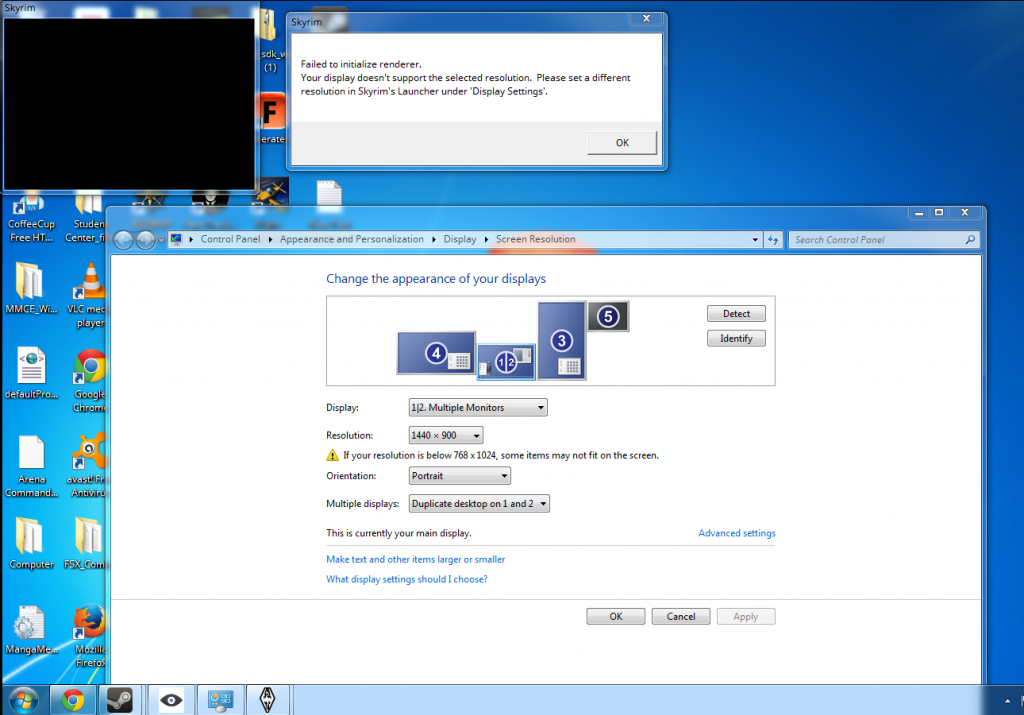
I’m also trying to get Fallout 3 running. It’s frustrating, because most everything I’ve tried with VorpX has been instantly successful and worked quite well.. But it just seems to refuse to recognize FO3. There doesn’t seem to be much written about this online; most people seem to get it to work effortlessly. I don’t have New Vegas installed, and I’m running Win 7 — it’s the Steam version of the game. Can anyone give me a hand? Thanks!
That looks, well, interesting…
Can’t replicate the issue unfortunately (using the Steam version of ME). So all I have are a few general things:
– Disable (or better uninstall, then restart Windows) the MSI Gaming App and Shadowplay (GeForce Experience). Both programs probably hook into DirectX similar to vorpX, which might cause a conflict.
– Try to switch from Z-Buffer to Geometry 3D or vice versa and restart the game. This might help.
– Try another graphics driver version. The card itself can be ruled out, I think. The main dev machines have a GTX770 here ATM, but maybe it’s an issue with a specific driver version.
– In case your old machine had an nVidia graphics card too (and you still have it), please check whether any graphics driver settings are different than before.
– if nothing helps, please send me a screenshot of your task manager showing all running processes to support |at| vorpx com . Maybe I can spot something else that possibly interferes with vorpX.
(- Just in case you haven’t done so already: please check the trouble shooting guide above.)

